











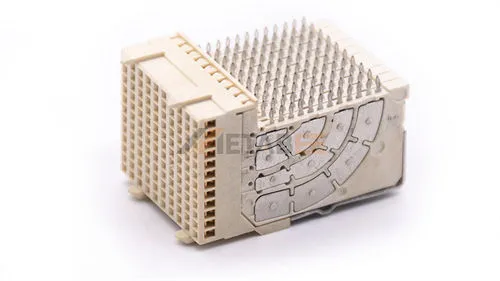

Storage interfaces play an important role in connecting storage devices with computer systems. They define how data moves between storage devices, controllers, and host systems.
Among different storage technologies, SCSI, SATA, and SAS are three important interfaces that have influenced the development of storage systems. However, many users confuse their differences because they are closely related but designed for different applications.
SCSI was one of the earliest enterprise storage interfaces, providing reliable communication for servers and workstations. SATA later became popular as a cost-effective storage interface for consumer and general-purpose systems. SAS combined the advantages of SCSI command technology with serial communication, becoming a widely used interface for enterprise storage.
This guide explains the differences between SCSI vs SATA vs SAS from multiple perspectives, including interface technology, performance, applications, compatibility, and connector design. It helps engineers, system integrators, and buyers understand which storage interface is suitable for different applications.
- Understanding SCSI, SATA, and SAS Interfaces
- What Is SATA?
- What Is SAS?
- Evolution of SCSI, SATA, and SAS Storage Interfaces
- SCSI vs SATA vs SAS: Interface Comparison
- How to Choose Between SAS, SCSI, and SATA?
- Conclusion
- FAQs
Understanding SCSI, SATA, and SAS Interfaces
Although SCSI, SATA, and SAS are all storage interfaces, they use different technologies and target different applications. Understanding their basic concepts helps explain why they have different performance and connector designs.
What Is SCSI?
SCSI stands for Small Computer System Interface. It is a standard interface used to connect computers with storage devices and other peripherals.
Traditional SCSI uses parallel communication, which means multiple data bits transmit simultaneously through separate signal lines. This design allowed multiple devices to connect to a single bus and made SCSI popular in early enterprise systems.
Key Features of SCSI
- Parallel communication: Transfers multiple bits simultaneously through multiple signal lines.
- Multi-device connection: Allows multiple storage devices to connect through a single SCSI bus.
- Reliable data communication: Designed for stable operation in professional computing environments.
- Multiple connector formats: Uses different connectors depending on SCSI generations.
SCSI Connector Overview
Common SCSI versions include:
- SCSI-1
- SCSI-2
- SCSI-3
- Ultra SCSI
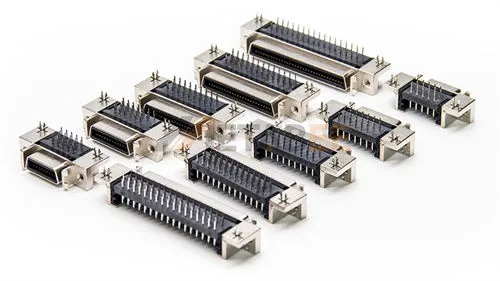
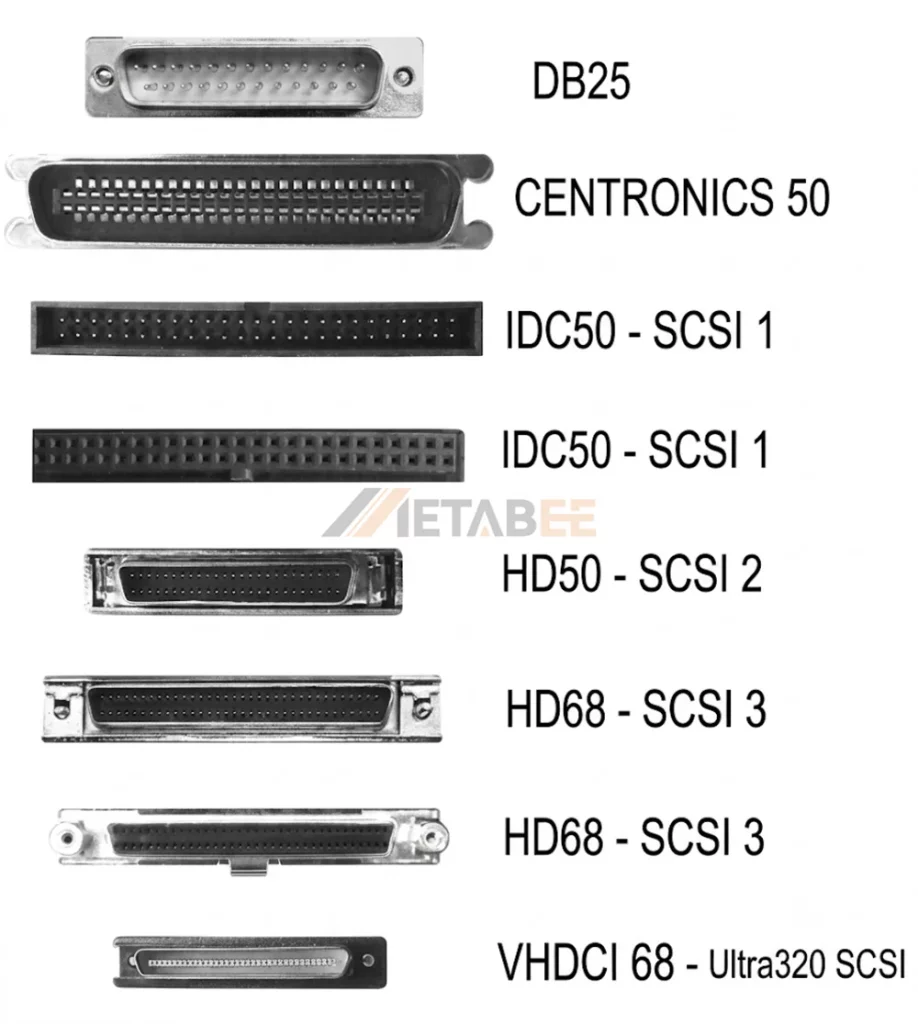
As SCSI evolved through different generations, its physical connectors also changed to meet different application requirements. Depending on the SCSI standard and device type, various designs of SCSI connectors were developed. Common examples include:
- 50-pin SCSI connectors
- 68-pin SCSI connectors
- VHDCI connectors
These connectors are larger than modern serial storage connectors because SCSI uses parallel signal transmission and requires more pins.
Common SCSI Connector Types
Related Post: Ultimate Guide to SCSI Connector: Pinout Diagrams, Types, and How It Works
What Is SATA?
SATA stands for Serial ATA. It is a storage interface developed to replace Parallel ATA and provide a simpler serial connection method.
Unlike traditional SCSI, SATA uses serial data transmission, which transfers data through a high-speed serial link instead of multiple parallel channels. This design reduces cable complexity and improves connection efficiency.
The SATA interface became widely used because of its simple structure, broad compatibility, and practical design. It uses separate connectors for data transmission and power supply, making it easy to identify and install.
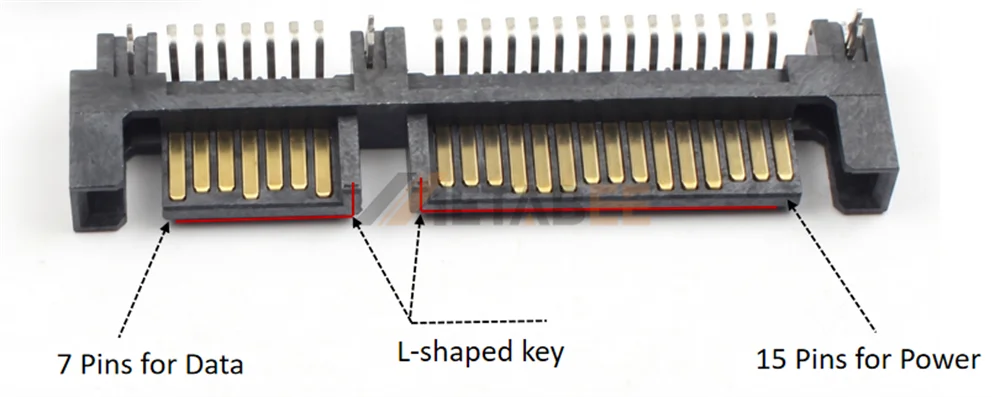
The SATA connection uses a separate data and power connector design. A standard SATA connection includes:
- 7-pin SATA data connector
- 15-pin SATA power connector
The SATA connector features an L-shaped key design that helps prevent incorrect insertion. Its compact size makes it suitable for many storage devices.
Key features of SATA:
- Low cost
- Large storage capacity
- Simple installation
- Wide compatibility
SATA Data and Power Connector Structure
What Is SAS?
SAS stands for Serial Attached SCSI. It is a storage interface that combines SCSI command technology with serial communication.
Unlike traditional parallel SCSI, SAS uses a serial architecture to improve the connection method between storage devices and controllers. It keeps the advantages of SCSI technology while adopting a more modern interface design.
The relationship between SCSI and SAS is important:
- SAS is the serial evolution of SCSI technology.
SAS maintains the SCSI command structure, which allows it to support enterprise storage requirements while providing improved scalability and signal performance.
SAS connectors are designed for enterprise storage environments. Different applications use different SAS connector formats, such as:
- SFF-8482
- SFF-8643
- SFF-8644
Compared with consumer storage connectors, SAS connectors usually support higher-density storage systems and server-level cable assemblies.
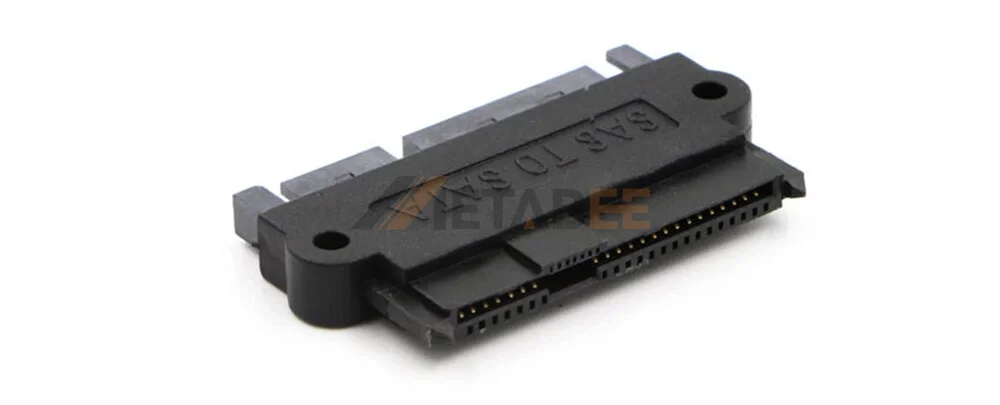
SFF–8482 SAS
Evolution of SCSI, SATA, and SAS Storage Interfaces
The evolution of SCSI, SATA, and SAS storage interfaces reflects the changing needs of storage systems. Enterprise storage evolved through different technologies: SCSI established the foundation of enterprise storage, SATA focused on affordable storage solutions, and SAS continued the SCSI technology path for modern enterprise systems.
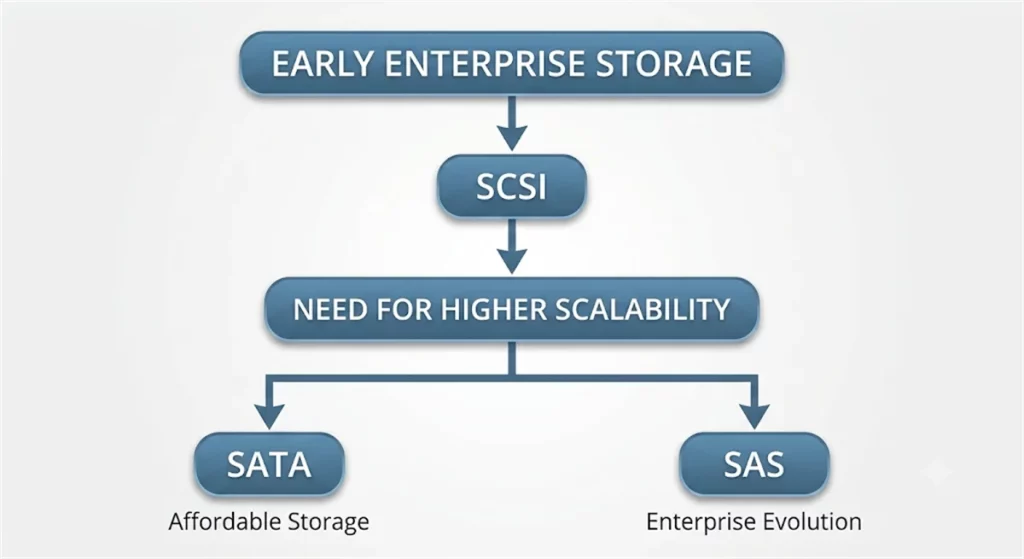
SCSI: The Foundation of Enterprise Storage Interfaces
SCSI became an important storage interface when enterprise systems required reliable communication and support for multiple storage devices.
As storage demands increased, traditional SCSI faced limitations in scalability and system complexity. This created the need for newer storage interfaces with improved connection methods.
SATA: Designed for Affordable Storage
SATA was developed as the successor to PATA to provide a simpler and more cost-effective storage connection.
By adopting a serial design, SATA reduced cable complexity and improved compatibility. It became a common choice for general storage applications where affordability and ease of use were important.
SAS: The Enterprise Evolution of SCSI
SAS (Serial Attached SCSI) continued the SCSI technology path by combining the SCSI command structure with modern serial communication.
It was developed to overcome the limitations of traditional SCSI while maintaining enterprise storage reliability. Today, SAS serves modern enterprise storage systems, while SATA remains focused on cost-effective storage solutions.
SCSI vs SATA vs SAS: Interface Comparison
When comparing SCSI vs SATA vs SAS, it is important to understand that these interfaces were designed for different storage requirements.
SCSI focused on reliable enterprise storage connectivity in early computer systems. SATA was developed as a cost-effective storage interface for general computing applications. SAS continued the SCSI technology path and became the modern solution for enterprise storage environments.
Although SAS, SATA, and SCSI are all storage interfaces, they are not direct replacements for each other. The right choice depends on performance requirements, workload, system compatibility, and budget.
SCSI vs SATA vs SAS: Quick Comparison Overview
The following table provides a quick overview of the main differences between SCSI vs SATA vs SAS interfaces.
| Feature | SCSI | SATA | SAS |
| Full Name | Small Computer System Interface | Serial ATA | Serial Attached SCSI |
| Interface Type | Parallel interface | Serial interface | Serial interface |
| Main Purpose | Foundation of enterprise storage | Affordable storage solution | Enterprise storage evolution |
| Key advantage | Reliable communication | Low cost and high capacity | Scalability and enterprise reliability |
| Connection Design | Multi-pin parallel connection | Separate data and power connection | High-speed serial connection |
| Performance | Moderate | Standard | High |
| Reliability | High | Standard | Enterprise-grade |
| Cost | High | Low | Higher |
| Scalability | Limited | Limited | Excellent |
| Typical Applications | Legacy enterprise systems | Desktop, consumer storage, backup systems | Servers, RAID, data centers |
| Current Status | Legacy technology | Widely used | Modern enterprise standard |
Interface Architecture: Why SAS Evolved from SCSI?
The biggest difference between traditional SCSI and SAS comes from their communication architecture.
Traditional SCSI: Parallel Architecture
Traditional SCSI uses parallel signal transmission. Multiple data signals travel through separate lines at the same time.
This design provided reliable communication for early enterprise systems. However, as storage speeds increased, parallel architecture created several challenges:
- More complex cable structures
- Higher signal interference risk
- Limited scalability
- More difficult system expansion
These limitations made traditional SCSI harder to adapt to modern storage requirements.
SAS: Serial Architecture with SCSI Technology
SAS solved many limitations of traditional SCSI by adopting serial communication.
Unlike parallel SCSI, SAS uses dedicated point-to-point connections between devices. This design improves scalability and simplifies storage system expansion.
SAS also keeps the SCSI command structure, allowing it to maintain enterprise storage features while adopting a more modern physical architecture.
SAS vs SATA Performance: What Makes SAS Different?
Many users compare SAS vs SATA performance, but the difference does not only come from data transfer speed.
The main differences come from workload design, command processing, and system reliability.
Command Protocol Difference
SATA uses the ATA command protocol, which originated from consumer and personal computer storage applications.
SAS uses the SCSI command set, which supports more complex enterprise storage operations.
This allows SAS systems to handle demanding workloads such as:
- Multiple user access
- Database operations
- Virtualized environments
- Workload Capability
SATA focuses on affordable storage capacity. It performs well in applications that require large amounts of storage but do not require constant heavy workloads.
Interface Speed and Data Transfer Rate
Interface speed represents the maximum bandwidth supported by the storage interface, but it does not always equal actual drive performance.
Common interface speeds include:
| Interface | Maximum Data Rate |
| SATA III | Up to 6 Gb/s |
| SAS-2 | Up to 6 Gb/s |
| SAS-3 | Up to 12 Gb/s |
| SAS-4 | Up to 22.5 Gb/s |
Newer SAS generations provide higher bandwidth than SATA, which helps enterprise storage systems handle larger amounts of data and more demanding workloads.
However, interface speed is only one factor that affects storage performance. Actual performance also depends on the drive type, workload, RAID configuration, and system architecture.
Therefore, SAS does not outperform SATA only because of higher transfer rates. Its main advantages come from enterprise features such as better scalability, dual-port support, and reliable operation under continuous workloads.
Dual-Port Capability
One important difference between SAS and SATA is connection redundancy. Many SAS drives support dual-port connections. This allows two independent paths between the drive and storage controller.
Benefits include:
- Improved availability
- Redundant connections
- Better fault tolerance
Most SATA drives use a single connection path, which makes them more suitable for simpler storage systems.
Why did SATA not disappear?
The answer is that SATA and SAS target different storage requirements. The two technologies complement each other rather than completely replacing one another.
SATA remains popular because it provides:
- Lower Cost:SATA drives offer a lower cost per terabyte, making them attractive for large-capacity storage.
- High Capacity Options:Many SATA drives focus on maximizing storage capacity rather than enterprise-level workload performance.
- Simple Integration:SATA has broad compatibility with desktop systems, NAS devices, and general storage platforms.
SAS vs SATA Compatibility: Can They Work Together?
While SAS and SATA drives use similar physical connectors, physical compatibility does not mean protocol compatibility.
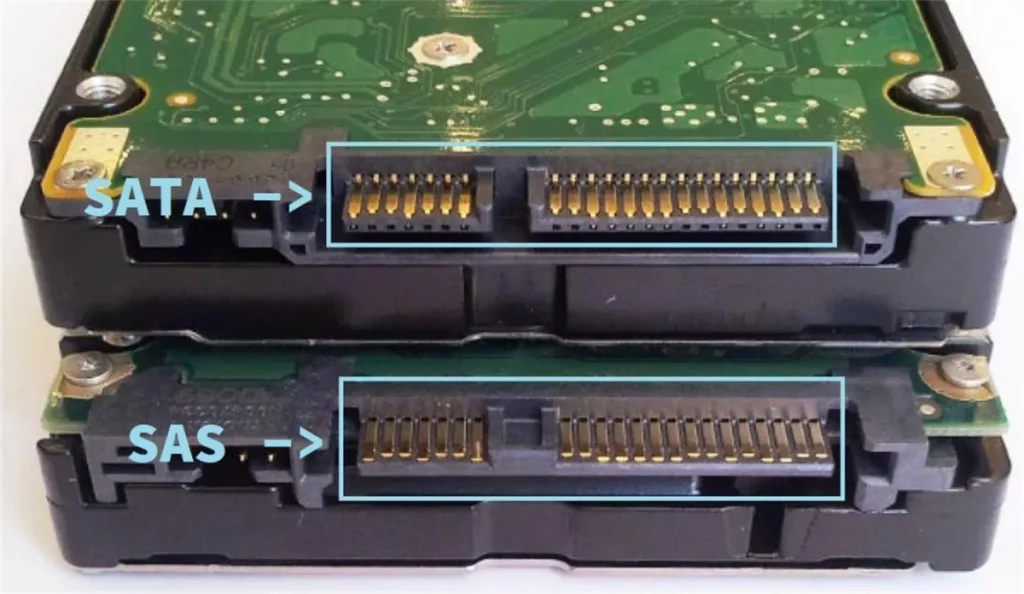
SAS drives use the SCSI command protocol, while SATA drives use the ATA command protocol. The controller determines whether a storage system can communicate with a specific drive type.
A SAS controller can support both SAS and SATA drives because it can handle both SAS and SATA protocols.
However, a SATA controller cannot support SAS drives because it:
- Does not support the SAS protocol
- Lacks SAS device management capabilities
- Cannot recognize or operate SAS drives
This is why SAS systems provide broader storage compatibility, while SATA systems only support SATA devices. The compatibility of SAS controllers allows enterprise storage systems to combine SAS and SATA drives according to different performance and cost requirements.
| Controller | SAS Drive | SATA Drive |
| SAS Controller | Supported | Supported |
| SATA Controller | Not Supported | Supported |
How to Choose Between SAS, SCSI, and SATA?
Choosing between SAS, SCSI, and SATA depends on your storage requirements, system compatibility, and budget.
In most new storage systems, the choice usually comes down to SAS vs SATA, while SCSI is mainly used for legacy equipment.
Choose SATA for Cost-Effective Storage
SATA is suitable when you need large storage capacity at a lower cost.
Common applications include:
- General storage systems
- Backup and archive storage
- Cost-sensitive applications
SATA provides a good balance between capacity, compatibility, and price.
Choose SAS for Enterprise Storage
SAS is the better choice for systems that require higher reliability and scalability.
Common applications include:
- Enterprise servers
- Data centers
- High-performance storage systems
SAS provides better support for demanding workloads and long-term operation.
Choose SCSI for Legacy Compatibility
SCSI is mainly used when existing systems already rely on SCSI hardware.
For new storage designs, SAS usually provides a more modern alternative because it continues the SCSI technology foundation with improved scalability.
Conclusion
SCSI, SATA, and SAS serve different storage requirements. SATA provides a cost-effective solution for general storage, SAS delivers better scalability and reliability for enterprise systems, and SCSI mainly remains in legacy applications.
Choosing the right storage interface depends on performance needs, compatibility, and budget.
At Metabee, we provide reliable connector and cable assembly solutions for industrial and storage applications. With professional manufacturing and customization capabilities, we help customers develop suitable interconnect solutions for different project requirements.
Contact us today to discuss your connector and cable assembly needs.
FAQs
Q1: What devices use SAS and SATA drives?
A: SATA drives are commonly used in desktops, NAS systems, and backup storage where cost and capacity matter. SAS drives are mainly used in enterprise servers, data centers, and storage arrays that require higher reliability and scalability.
Q2: Can you replace a SCSI drive with a SAS drive?
A: Replacing a SCSI drive with a SAS drive requires checking system compatibility. The controller, backplane, and storage system must support SAS technology before upgrading.
Q3: Are SAS drives faster than SATA drives?
A: SAS drives are designed for enterprise workloads and provide better reliability, scalability, and workload handling. SATA drives focus on cost-effective storage and large capacity.
Q4: Is SCSI still used today?
A: Traditional SCSI is rarely used in new storage systems. Most modern enterprise systems use SAS as the successor to SCSI technology.
