
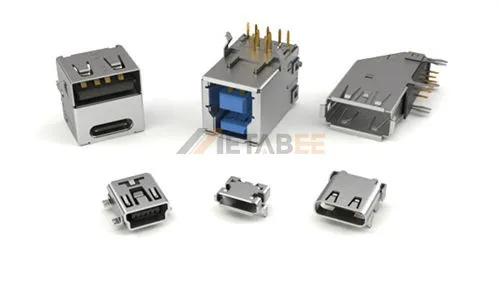
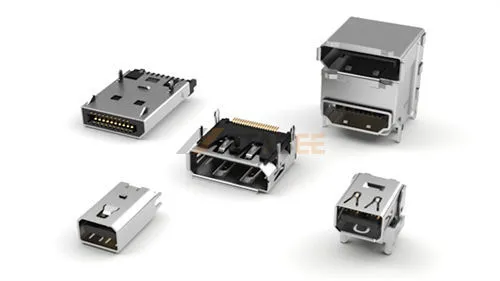
Mini DisplayPort is a compact connector that can be found on laptops, workstations, graphics cards, and other display devices. Its small size makes it easy to confuse with other interfaces, especially Thunderbolt, which uses a similar connector shape.
Understanding Mini DisplayPort requires more than identifying its connector shape. Its pin configuration, DisplayPort version, signal capabilities, and connection method all affect how it works with different displays and adapters. This guide explains these technical details in a practical way, helping you identify Mini DisplayPort and understand its capabilities and compatibility.
What is the Mini DisplayPort?
Mini DisplayPort (Mini DP or mDP) is a compact 20-pin connector designed to transmit uncompressed digital video and audio using native DisplayPort protocols. While DisplayPort defines the underlying communication standard, Mini DisplayPort specifies the smaller physical form factor.
Introduced by Apple in 2008 and later standardized by VESA, the connector was created for space-constrained laptops, graphics cards, and workstations. Its compact footprint does not limit bandwidth or display resolution; those capabilities depend entirely on the specific DisplayPort revision implemented on the device.
Key Features
- 20-pin compact connector
- Four Main Link lanes
- Digital video and audio
- Up to 32.4 Gbps with DisplayPort 1.4
- Compatible with multiple display interfaces
- Designed for space-constrained devices
Why Does Mini DisplayPort Still Matter?
Mini DisplayPort was designed to provide full DisplayPort functionality in a smaller connector, making it useful for thin devices and graphics hardware with limited I/O space. Its established installed base also keeps it relevant today. Many existing devices still use Mini DP, while Thunderbolt 1 and 2 ports can support Mini DisplayPort displays.
For engineers and buyers, this means Mini DP remains relevant when maintaining existing equipment, replacing components, or connecting legacy hardware to current displays.
Mini DisplayPort Connector Types
Classified by Gender
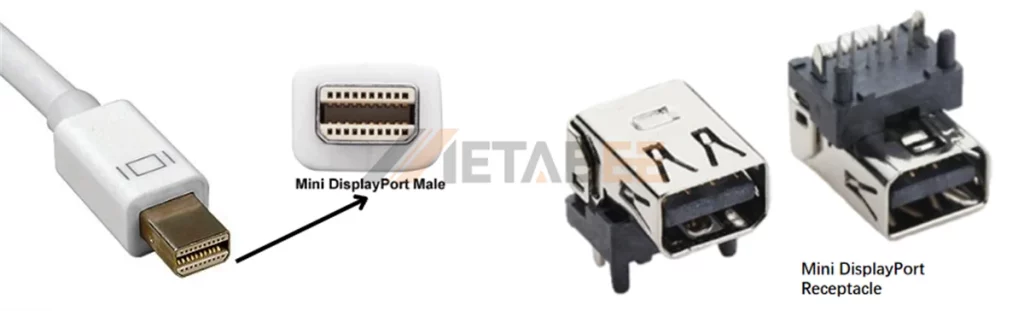
Mini DisplayPort uses a 20-pin compact male plug and female receptacle. Full-sized DisplayPort secures connections with a mechanical push-latch and features a single chamfered corner along one bottom edge. In contrast, Mini DisplayPort uses a friction-fit shell with symmetrical chamfered corners along the bottom edges. This design ensures clean blind-mating and prevents inverted insertion.
Classified by Mounting Types
- SMT (Surface Mount): Surface-soldered with no through-holes, ideal for compact, high-density dual-sided PCB layouts.
- DIP (Through-Hole): Leads pass through PCB holes for wave soldering, offering superior shear strength and durability against frequent mating.
- Hybrid (SMT + DIP): Combines SMT signal pins for high-speed signal integrity with through-hole grounding tabs for robust retention.
Technical Specifications
Interface Dimensions
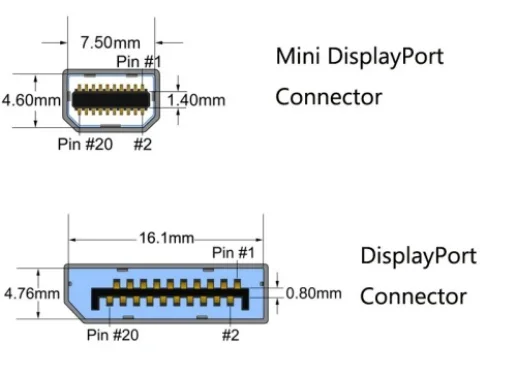
The mating interface is strictly standardized under VESA specifications. Regardless of the manufacturer, all Mini DP plugs share fixed core dimensions to guarantee cross-brand mechanical fit:
- Standard Plug Interface Width: 7.50 mm (±0.05 mm)
- Standard Plug Interface Height: 4.60 mm (±0.05 mm)
- Contact Pitch: 0.635 mm (high-density 20-pin layout)
Mini DP connector footprint is significantly smaller than full-size DisplayPort (7.50 mm vs. 16.10 mm in width), making it far easier to integrate into thin notebooks and high-density I/O panels on workstation graphics cards.
| Mechanical Specification | Mini DisplayPort (mDP) | Full-Size DisplayPort (DP) |
| Connector Width (Interface) | 7.50 mm (±0.05 mm) | 16.10 mm |
| Connector Height | 4.60 mm (±0.05 mm) | 4.76 mm |
| Contact Pitch | 0.635 mm (High-density) | 1.00 mm |
| Retention Mechanism | Friction-fit (Symmetrical chamfer) | Mechanical push-latch |
| Rated Mating Cycles | 10,000 cycles | 10,000 cycles |
| Common PCB Mounts | SMT, Hybrid DIP, Sink-Type (Mid-mount) | Top-mount SMT, Through-hole |
Need custom dimensions, PCB footprints, or ruggedized shells? Contact us today for tailored Mini DisplayPort connector and cable assembly solutions.
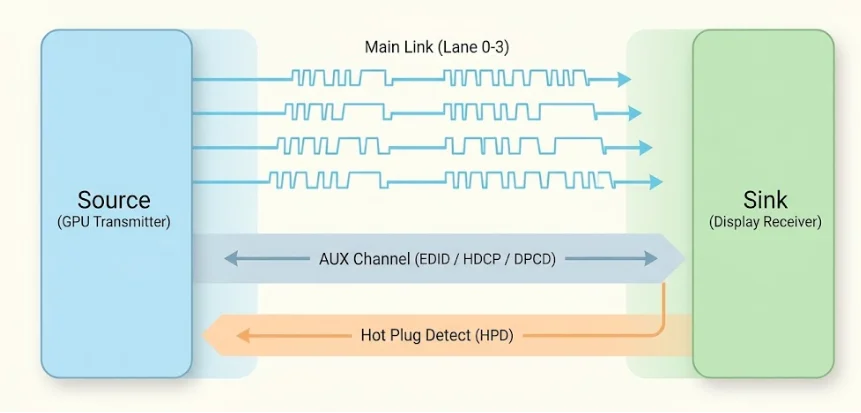
Signal Lanes
Mini DisplayPort transmits digital audio and video across three independent hardware signal paths:
- Main Link (4 Differential Lanes):
Mini DisplayPort features four high-speed differential pairs (Lane 0 to Lane 3). Unlike HDMI, which requires a dedicated physical clock line, Mini DisplayPort embeds the clock signal directly into the data stream via 8b/10b encoding. Graphics processors dynamically allocate 1, 2, or 4 lanes based on display resolution and bandwidth demands.
- AUX Channel (Auxiliary Link):
This dedicated, bi-directional half-duplex differential channel operates at 1 Mbps (up to 720 Mbps in Fast AUX mode). The AUX channel manages EDID handshakes, DPCD link status queries, and HDCP encryption without consuming primary video bandwidth.
- Hot Plug Detect (HPD):
Operating at 3.3V logic levels, the HPD pin issues an interrupt pulse whenever a user connects or disconnects a cable. This pulse immediately prompts the host graphics card to negotiate link parameters and activate the display output.
Bandwidth and Supported DP Versions
Mini DisplayPort is a physical connector standard, not a separate protocol. Its actual throughput scales directly with the VESA DisplayPort specification implemented in the silicon.
| DP Standard | Max Link Rate / Lane | Total Raw Bandwidth | Max Data Payload | Maximum Resolution & Refresh Rate |
| DisplayPort 1.1a | 2.70 Gbps (RBR / HBR) | 10.80 Gbps | 8.64 Gbps | 1080p @ 144Hz / 2560×1600 @ 60Hz |
| DisplayPort 1.2 / 1.2a | 5.40 Gbps (HBR2) | 21.60 Gbps | 17.28 Gbps | 4K @ 60Hz / 1440p @ 144Hz / Multi-Stream (MST) |
| DisplayPort 1.3 | 8.10 Gbps (HBR3) | 32.40 Gbps | 25.92 Gbps | 4K @ 120Hz / 5K @ 60Hz / 8K @ 30Hz |
| DisplayPort 1.4 / 1.4a | 8.10 Gbps (HBR3 + DSC) | 32.40 Gbps | 25.92 Gbps (~77 Gbps effective) | 4K @ 144Hz HDR / 8K @ 60Hz HDR (via DSC 1.2) |
Mini DisplayPort Pinout
The diagram below details the 20-pin Mini DisplayPort layout and the specific signal function of each contact.
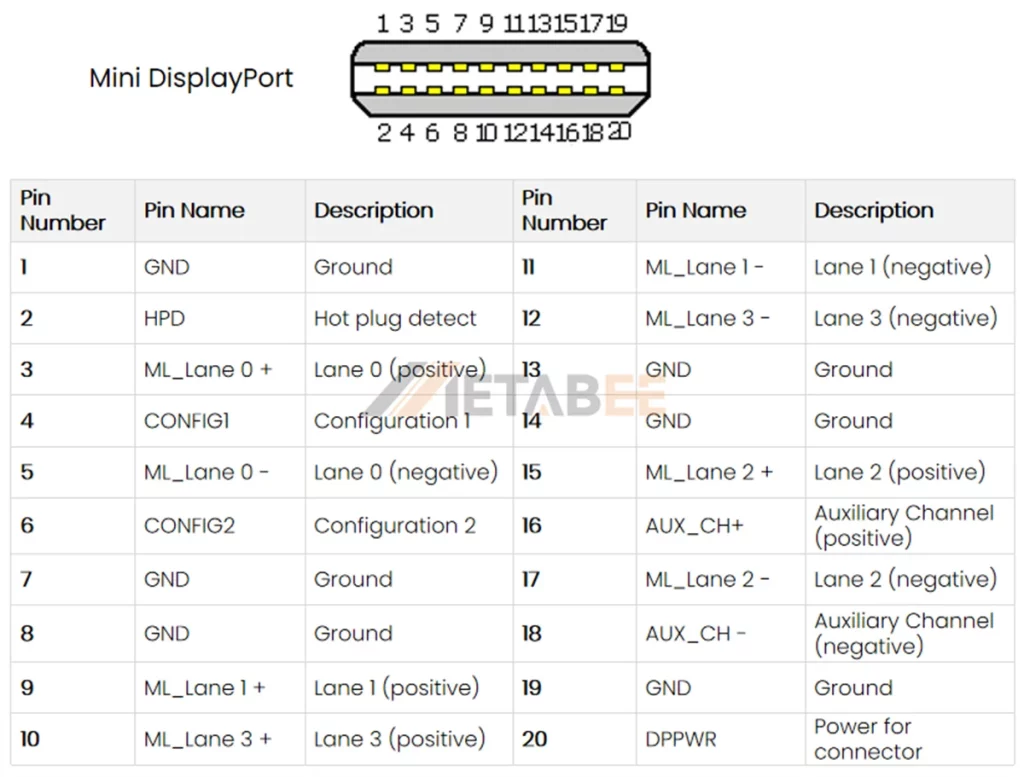
Note: This is the pinout for the source-side connector; the sink-side connector pinout will have lanes 0-3 reversed in order, i.e. lane 3 will be on pin 3 and 5 while lane 0 will be on pin 10 and 12.
Pinout Layout & Electrical Considerations
- High-Speed Pair Isolation: Mini DP groups each differential data pair with adjacent ground pins (e.g., Lane 0 on Pins 3/5 isolated by Pins 1/7) to minimize crosstalk in its compact 0.635 mm pitch.
- Cable Shielding & Impedance (DP 1.4): High-speed cable assemblies require individually foil-shielded pairs and an overall tinned copper braid (≥85% coverage) to maintain strict 100Ω differential impedance.
- Pin 20 (DP_PWR) Usage: Delivers 3.3V power (up to 500mA) strictly for active converter dongles; standard passive cables omit direct Pin 20-to-Pin 20 connection to prevent host-to-source backpowering issues.
Key Pinout Differences: Mini DP vs. Standard DP
Mini DisplayPort and full-size DisplayPort both use 20 pins and the same basic signal architecture, but their pin assignments and physical layouts are different. The main pin differences include:
- Pin 1 & Pin 2: Standard DisplayPort assigns Pin 1 to Main Lane 0+ and Pin 2 to Ground. Mini DisplayPort assigns Pin 1 to Ground and Pin 2 to Hot Plug Detect (HPD).
- Pin 18 & Pin 20: Standard DisplayPort routes HPD to Pin 18 and Power (DP_PWR) to Pin 20. Mini DisplayPort places the AUX Channel negative signal (AUX_CH -) on Pin 18, while preserving DP_PWR on Pin 20.
- Ground Isolation: Mini DisplayPort groups ground connections (Pins 1, 7, 8, 13, 14, 19) to isolate differential pairs within its compact 0.635 mm pin pitch.
Mini DisplayPort vs. Thunderbolt 1/2: Clearing the Confusion
Is Mini DisplayPort the Same as Thunderbolt?
No. Mini DisplayPort and Thunderbolt (1 & 2) share the same physical connector, but they run entirely different protocols. Mini DisplayPort operates strictly as a dedicated, passive audio and video pipeline for external displays. In contrast, Thunderbolt multiplexes DisplayPort video streams and high-speed PCI Express (PCIe) data onto a single cable, delivering DC power, high-throughput data transfer, and daisy-chaining support for up to six devices.
The cable construction and product lifespan also differ. Mini DisplayPort relies on passive copper lines, while Thunderbolt requires active cables with built-in controller chips in both connector ends to manage signal integrity. Furthermore, this shared 20-pin physical design was temporary: Intel and Apple retired the Mini DP shell after Thunderbolt 2, transitioning entirely to USB-C starting with Thunderbolt 3.
How to Tell Them Apart: Identifying the Icons
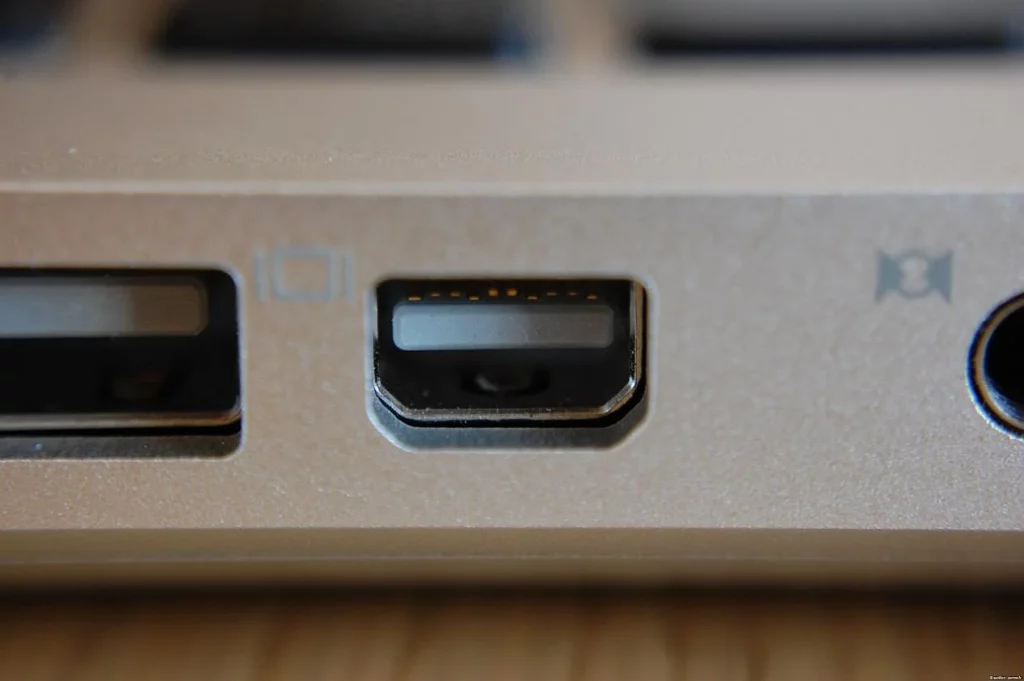
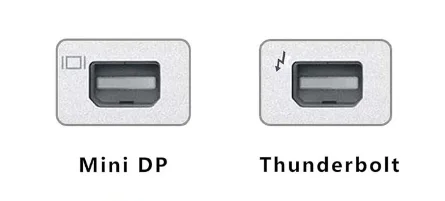
Since Mini DisplayPort and Thunderbolt 1/2 share the same physical shape, the only visual way to distinguish them is by the icon stamped next to the port or on the cable connector:
- Mini DisplayPort: Marked with a Display/Monitor icon (a rectangle between two vertical bars, or a simple screen symbol |P|).
- Thunderbolt 1 & 2: Marked with a Lightning bolt icon (a lightning symbol, often ending in a small downward arrow).
Compatibility: Can You Mix and Match?
Rule of Thumb: A Thunderbolt port can drive a Mini DisplayPort monitor, but a Mini DisplayPort cannot power or communicate with Thunderbolt peripherals.
While the connectors physically fit interchangeably, compatibility depends strictly on the signal source and the peripheral’s protocol:
| Host Port (Computer) | Connected Peripheral / Cable | Compatible? | Practical Result |
|---|---|---|---|
| Thunderbolt 1 / 2 | Mini DP Monitor / Passive DP Cable | YES | Works normally. The port automatically drops back to standard DisplayPort video. |
| Thunderbolt 1 / 2 | Thunderbolt Device (Drive / Dock) | YES | Full speed with PCIe data throughput and power delivery. |
| Mini DisplayPort | Mini DP Monitor / Passive DP Cable | YES | Standard audio and video output. |
| Mini DisplayPort | Thunderbolt Device (Drive / Dock) | NO | Device will not be detected. Mini DP lacks the PCIe controller required for data. |
| Mini DisplayPort | Apple Thunderbolt Display (27-inch) | NO | Screen remains black. The display requires an active Thunderbolt handshake, not raw DP. |
Connecting Mini DP to External Displays: The Adapter Guide
Mini DisplayPort connects natively or via adapters to modern and legacy displays. Compatibility depends on whether the connection requires simple physical routing or active protocol conversion.
Mini DP to Full-Size DisplayPort
Mini DP and standard DisplayPort share the identical signaling protocol. Adapters and cables between them are purely physical pin-to-pin pass-throughs—requiring no conversion chips, introducing zero latency, and working bidirectionally.
Mini DP to HDMI / DVI / VGA: Passive vs. Active Adapters
Converting DisplayPort to other display interfaces requires bridging different electrical signaling standards:
- Passive Adapters: Contain no internal conversion chip and rely entirely on Dual-Mode DisplayPort (DP++) from the source GPU to output HDMI/DVI signals. Best for single-monitor setups running 1080p or basic 4K @ 30Hz.
- Active Adapters: Feature an onboard protocol converter IC to actively translate native DisplayPort data packets into HDMI, DVI, or analog VGA signals. Required for multi-monitor setups (AMD Eyefinity / NVIDIA Surround), high-refresh-rate 4K @ 60Hz/120Hz displays, or legacy analog VGA connections.
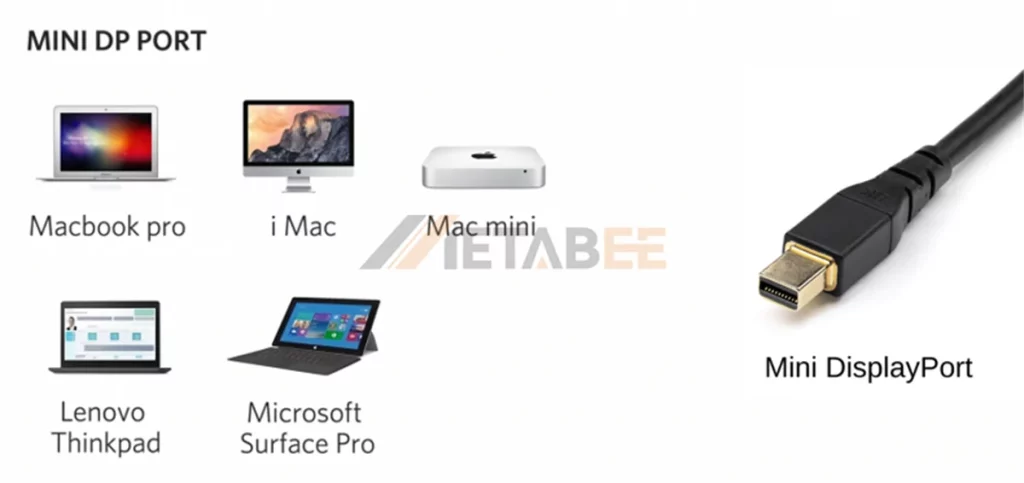
Applications of Mini DisplayPort Today
Mini DisplayPort can still be found on older laptops, workstations, graphics cards, monitors, and professional display equipment. It is also used in existing systems where a compact, dedicated DisplayPort connection is already built into the hardware.
Conclusion
Mini DisplayPort has largely passed the baton to USB-C in modern consumer laptops, yet it established the blueprint for compact digital display interfaces. Operating on native DisplayPort signaling, it retains zero-latency, high-bandwidth performance that continues to power multi-display workstations, medical and industrial systems, and millions of reliable legacy machines. Whether identifying port markings or choosing between passive and active adapters for HDMI setups, grasping its core specifications ensures cost-effective, dependable connectivity across aging hardware and modern displays alike.
For engineering support, custom drawings, or bulk procurement inquiries, contact us today.
FAQs
Q1: Can I plug a Mini DisplayPort cable into a Thunderbolt port?
A: Yes. Thunderbolt 1 and 2 host ports are backward compatible with Mini DisplayPort. Connecting a Mini DP cable to a display prompts the host port to output standard DisplayPort video automatically.
Q2: Can Mini DisplayPort carry audio?
A: Yes. DisplayPort supports both digital video and audio, so a Mini DisplayPort connection can carry audio when the source and display support it.
Q3: Does Mini DisplayPort support 4K?
A: It can, depending on the DisplayPort version and the capabilities of the source device, cable, adapter, and display. The Mini DP connector itself does not determine the maximum resolution.
Q4: Can I connect a Mini DP computer to a USB-C monitor?
A: Only with bidirectional cables. Most USB-C to Mini DP cables are unidirectional, sending signals exclusively from USB-C PCs to Mini DP screens. Connecting a Mini DP host to a USB-C display requires a dedicated bidirectional cable or reverse active adapter. Note that Mini DP does not provide power delivery to portable displays.
Q5: Does Mini DisplayPort support daisy-chaining (MST)?
A: Yes on Windows, no on macOS. Systems with DisplayPort 1.2 support Multi-Stream Transport (MST) to daisy-chain monitors from a single port on Windows. macOS does not support DP MST for extended desktop configurations, limiting chained displays to mirrored mode only.
Q6: Are Mini DisplayPort and Mini HDMI interchangeable?
A: No. Mini DP is an asymmetrical 20-pin connector with beveled top corners, while Mini HDMI (Type-C HDMI) is a symmetrical 19-pin trapezoidal connector. Their physical footprints and signaling protocols are entirely different.
