
HDMI remains one of the primary interfaces for transmitting digital video and audio between source devices and displays. Since its introduction in 2002, the specification has evolved to support rising pixel densities and frame rates. HDMI 1.4, HDMI 2.0, and HDMI 2.1 represent three important stages in this development.
Selecting the right HDMI standard dictates throughput limits, color precision, and interface reliability in display hardware design. This guide evaluates HDMI 1.4, 2.0, and 2.1 across essential technical metrics to help you specify the right interface for your hardware builds.
What Is HDMI?
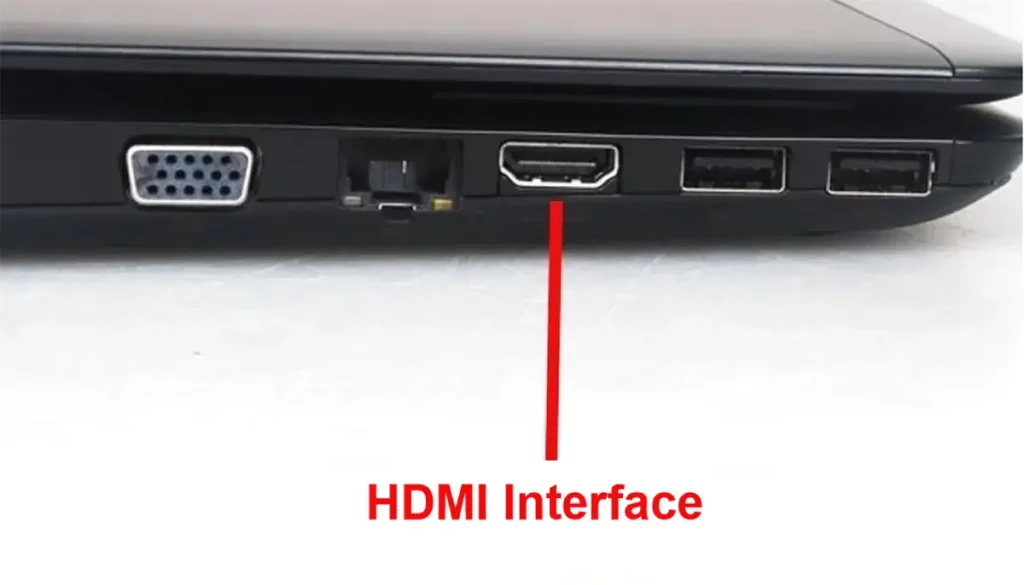
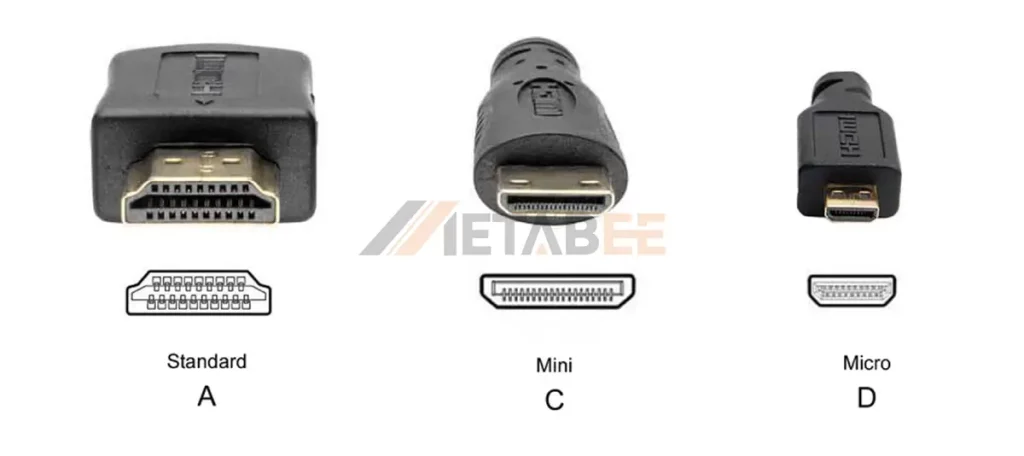
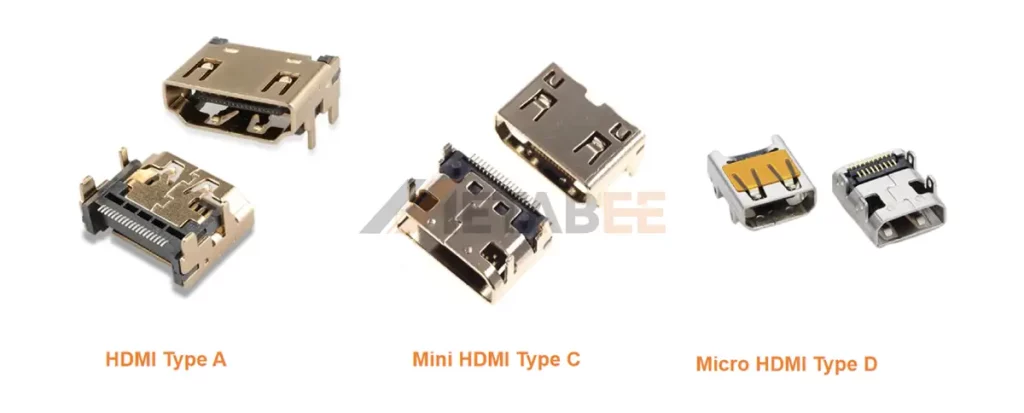
HDMI stands for High-Definition Multimedia Interface. HDMI is a digital interface for transmitting video and audio between compatible electronic devices. Standard HDMI connectors (Type A, Type C, and Type D) utilize a 19-pin configuration. The physical connector and the HDMI specification serve different purposes. Type A connectors describe the connector format, while HDMI 1.4 or HDMI 2.1 describes the interface specification.
Evolution of HDMI 1.4 to 2.1
- HDMI 1.4 (2009): Up to 10.2 Gbps, supporting 4K at up to 30 Hz, 3D, and ARC.
- HDMI 2.0 (2013): Increased bandwidth to 18 Gbps, enabling 4K at 60 Hz and expanded audio capabilities.
- HDMI 2.1 (2017): Increased bandwidth to 48 Gbps, supporting 4K at 120 Hz, 8K at 60 Hz, Dynamic HDR, VRR, and eARC.
HDMI 1.4 vs. 2.0 vs. 2.1: Key Differences Explained
The primary differences between HDMI 1.4, 2.0, and 2.1 involve bandwidth and the video formats that bandwidth can accommodate.
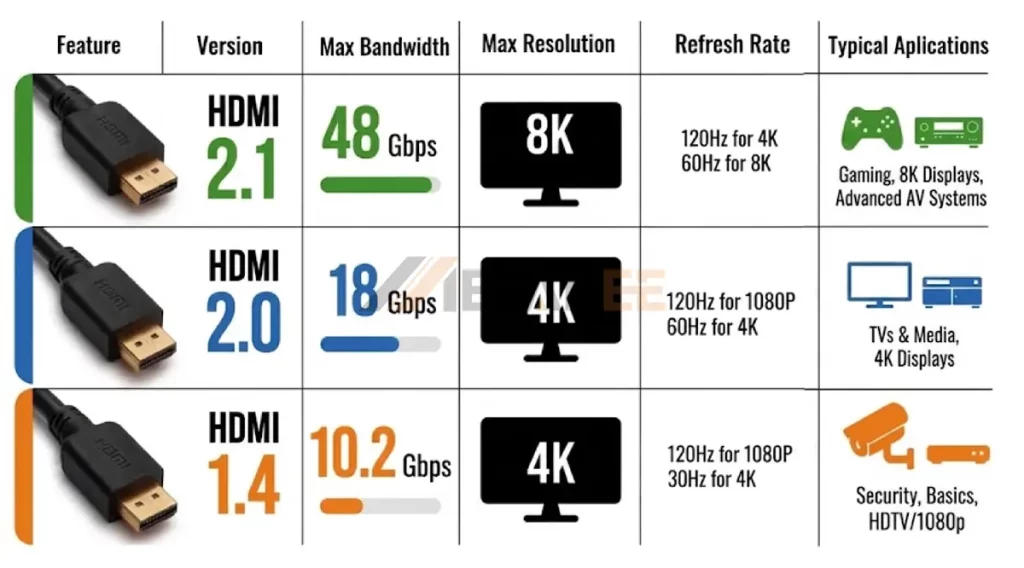
HDMI Version Quick Comparison Table
| Feature | HDMI 2.1 | HDMI 2.0 | HDMI 1.4 |
| Max Bandwidth | 48 Gbps | 18 Gbps | 10.2 Gbps |
| Max Resolution | 8K | 4K | 4K |
| Refresh Rate Support | 120Hz for 4K60Hz for 8K | 120Hz for 1080P60Hz for 4K | 120Hz for 1080P30Hz for 4K |
| Color Depth | 8-bit | 10-bit | 12-bit and higher |
| Signaling | FRL and TMDS compatibility | TMDS | TMDS |
| HDR | Dynamic HDR (HDR10+, Dolby Vision) | Static HDR (HDR10) | × |
| eARC | √ | × | × |
| VRR | √ | × | × |
| ALLM | √ | × | × |
| Required Cable Rating | Ultra High Speed (48G) | Premium High Speed | High Speed |
| Typical applications | High-refresh gaming, 8K, advanced AV systems | 4K displays and media systems | HDTV, 1080p, entry-level 4K |
These figures describe interface capabilities rather than guaranteed operating modes for every device.
Actual support depends on the source, display, cable, connector implementation, color format, bit depth, and system configuration.
Bandwidth: The Foundation of HDMI Performance
Bandwidth determines the maximum data payload an HDMI link can transfer per second.
- HDMI 1.4b provides up to 10.2 Gbps of maximum signaling bandwidth. This is sufficient for conventional Full HD applications and selected 4K formats.
- HDMI 2.0 increases the maximum bandwidth to 18 Gbps. This enables 3840 × 2160 video at 60 Hz under suitable signal configurations. Professional AV equipment commonly uses HDMI 2.0 for 4K60 distribution.
- HDMI 2.1 increases the maximum bandwidth to 48 Gbps. It uses an FRL (fixed-rate link) instead of the older TMDS architecture for higher-bandwidth transmission.
The jump from 18 to 48 Gbps is particularly important for 4K gaming and 8K applications. A 4K signal at 120 Hz requires substantially more data than a 4K signal at 60 Hz.Bandwidth also affects HDR and color reproduction. Engineers should therefore evaluate the complete signal format rather than selecting an HDMI version based only on resolution.
Resolution: Defining Image Detail and Clarity
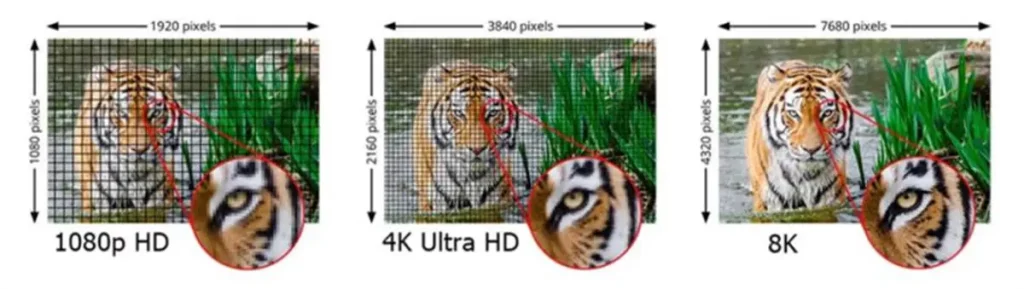
Resolution describes the number of pixels used to construct each image.
Common HDMI-related resolutions include:
1920 × 1080: Full HD
2560 × 1440: QHD(2K)
3840 × 2160: 4K UHD
7680 × 4320: 8K UHD
- HDMI 1.4 introduced support for 4K formats at 24, 25, and 30 Hz. This makes it suitable for many video playback applications, office displays, and older 4K equipment. It also supports 1920 × 1080 at 120 Hz.
- HDMI 2.0 expanded 4K capability to 60 Hz. This made it suitable for 4K monitors, digital signage, home theater equipment, and other applications requiring smoother 4K playback.
- HDMI 2.1 extends the interface to higher resolutions and refresh rates. The specification supports 4K at 120 Hz and 8K at 60 Hz, with additional resolutions available for specialized applications.
Resolution alone does not describe image quality. Color depth, chroma subsampling, HDR, compression, and display characteristics also influence the final image.
Refresh Rate: Delivering Smoother Motion
Refresh rate indicates how many times a display updates its image each second. It is measured in hertz (Hz). A 60 Hz display refreshes the image 60 times per second. A 120 Hz display doubles that refresh frequency.
- HDMI 1.4 support up to 120 Hz for 1080p and up to 30 Hz for selected 4K modes. This makes it adequate for Full HD gaming and many conventional video applications.
- HDMI 2.0 supports up to 60 Hz for 4K. This configuration suits many office monitors, televisions, and professional AV systems.
High refresh rates can also increase interface latency requirements. HDMI 2.1 addresses related use cases with features such as variable refresh rate and quick frame transport.
HDR Support: Enhancing Brightness, Contrast, and Color
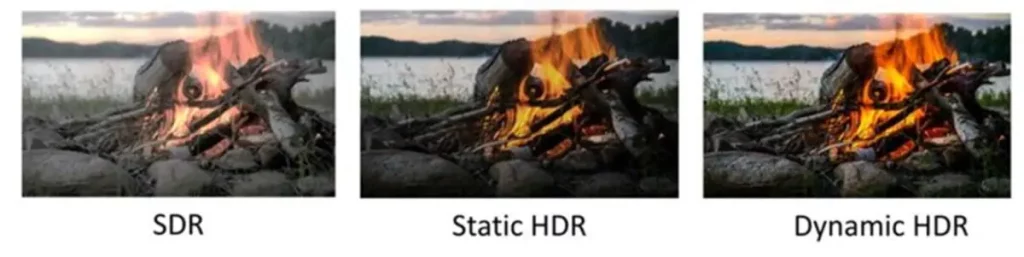
HDR stands for High Dynamic Range. It expands the range of brightness and color information that a display can reproduce compared with standard dynamic range content. HDR can improve highlight detail, shadow detail, and color reproduction.
- HDMI 1.4 does not include signaling for HDR metadata.
- HDMI 2.0 systems support HDR. It introduced static HDR signaling (CTA-861.3) for transmitting a single set of mastering metadata for an entire video file. Professional HDMI 2.0 equipment commonly specifies HDR support alongside 4K60 operation.
- HDMI 2.1 adds support for Dynamic HDR. Dynamic HDR can carry changing HDR metadata for individual scenes or frames. This allows compatible displays to adjust HDR presentation more precisely.
Dynamic HDR does not automatically appear on every HDMI 2.1 device. Manufacturers can choose which HDMI features their products implement. Engineers should verify supported HDR formats, color depth, chroma format, and refresh rate in the device specification.
Which HDMI Version Is Right for You?
Selecting an HDMI version should start with the required signal format. Consider the source resolution, target refresh rate, HDR requirements, audio architecture, cable length, and available PCB space. Then select the interface and connector configuration that can support those requirements.
Choose HDMI 1.4 If
HDMI 1.4 remains appropriate for systems that do not require high-bandwidth 4K operation.
Typical applications include:
- 1080p monitors and televisions
- 1080p gaming systems
- 4K video at 24, 25, or 30 Hz
- Office and presentation equipment
- Legacy consumer electronics
- Embedded systems with 1080p output
- Commercial digital signage running 1080p loops
If a design requires 4K60, HDR, or high-refresh-rate gaming, HDMI 1.4 usually provides insufficient bandwidth.
Choose HDMI 2.0 If
HDMI 2.0 is appropriate for systems that require 4K at 60 Hz without the additional bandwidth requirements of HDMI 2.1.
Typical applications include:
- 4K televisions
- 4K office monitors
- Conference-room displays
- Digital signage
- Home theater systems
- Professional AV distribution
- Set-top boxes
- Media players
3840 × 2160 display operating at 60 Hz is a common HDMI 2.0 application. HDMI 2.0 can save hardware costs if the system does not require 4K120, 8K, VRR, or eARC.
Choose HDMI 2.1 If
HDMI 2.1 becomes relevant when the system requires high refresh rates or higher-resolution video.
Typical applications include:
- 4K gaming at 120 Hz
- 8K displays
- High-refresh-rate monitors
- Professional visualization
- High-end AV receivers
- VR and immersive display systems
- Advanced home theater systems
- VRR gaming systems
- eARC-based audio systems
HDMI 2.1 supports up to 48 Gbps and provides features such as 4K120, 8K60, dynamic HDR, VRR, and eARC. The HDMI cable must also match the required performance.
Metabee HDMI Connector Types
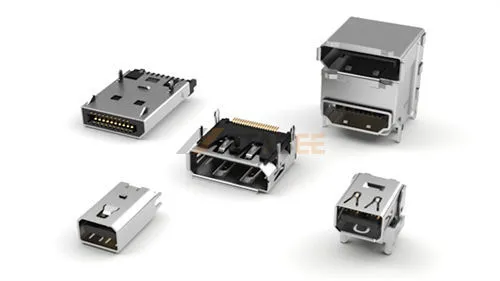
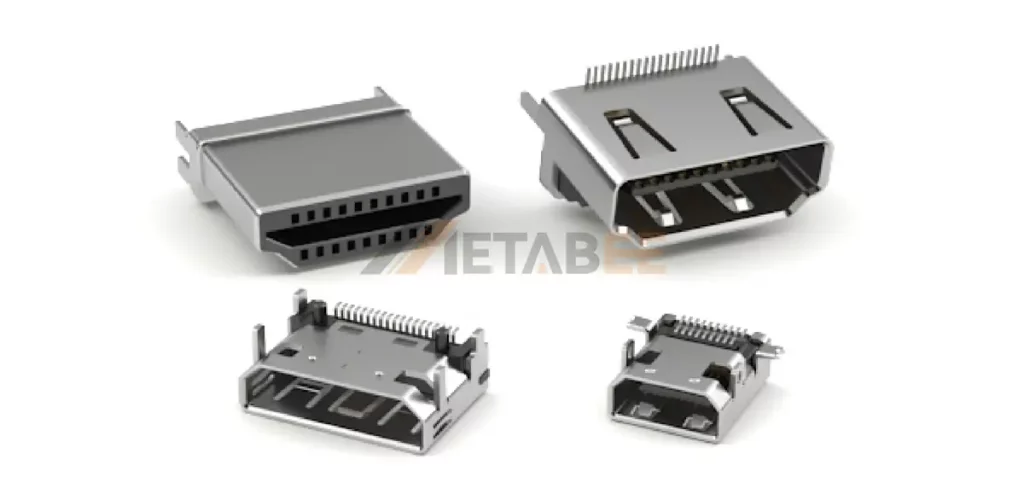
Metabee offers HDMI connector products covering standard Type A configurations, Mini HDMI Type C, Micro HDMI Type D, and several PCB mounting arrangements. Our catalog also includes single-port, dual-port products and HDMI 2.1 variants.
By Genger
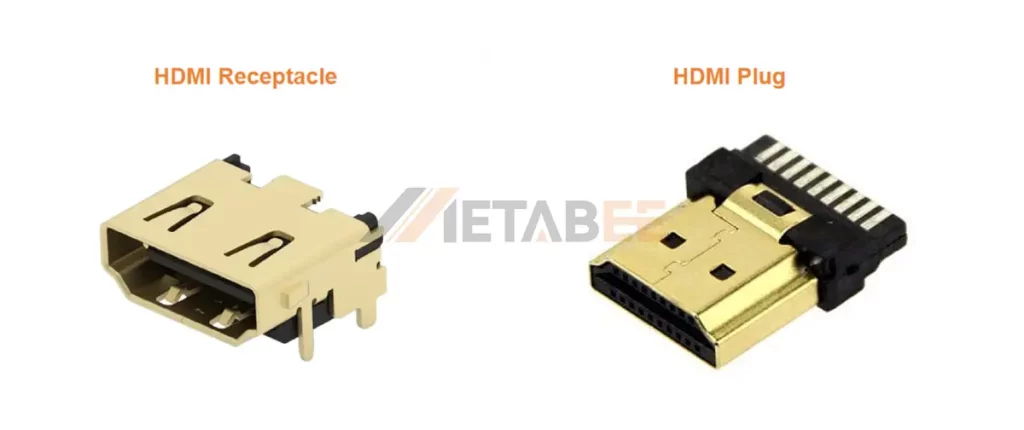
By Connector Type
Looking for the right HDMI connector for your next project?
Download our HDMI connector catalog to view product specifications, configurations, and available options.
Get a fast quote for samples or customized connector solutions to meet your specific design needs.
HDMI 2.2: The Next Generation of HDMI Technology
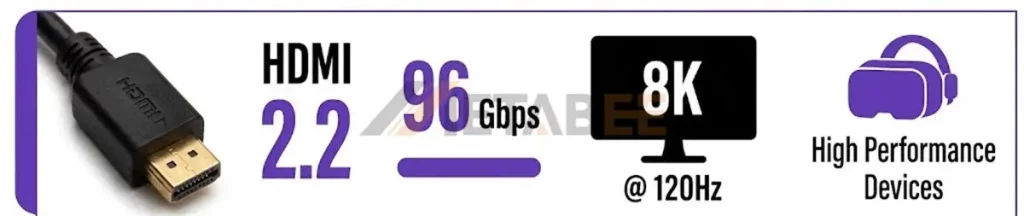
HDMI 2.2 is the latest HDMI specification released by the HDMI Forum in June 2025. It is designed to support higher resolutions, faster refresh rates, richer color, and more demanding gaming, professional AV, and immersive-display applications.
The biggest upgrade is its maximum bandwidth of up to 96 Gbps, which is twice the 48 Gbps maximum bandwidth of HDMI 2.1. HDMI 2.2 achieves this through an updated Fixed Rate Link (FRL) signaling technology. HDMI 2.2 supports 4K at 240 Hz, 8K at 60 Hz with full 4:4:4 chroma, 12K at 120 Hz, and 16K at 60 Hz, depending on the specific implementation and whether compression is used.
Key Features:
- This specification also incorporates VESA Display Stream Compression, or DSC 1.2a, for supported compressed video modes. DSC is described as visually lossless compression.
- Another addition is the HDMI Latency Indication Protocol, known as LIP. It targets audio and video synchronization problems in complex multi-device configurations.
- HDMI 2.2 also introduces the Ultra96 HDMI cable designation. The Ultra96 HDMI Cable supports up to 96 Gbps and is intended to support HDMI 2.2 applications at their maximum bandwidth.
The cable category therefore becomes increasingly important as bandwidth increases. HDMI 2.1 systems requiring 48 Gbps use Ultra High Speed HDMI cables, while HDMI 2.2 systems requiring the full 96 Gbps use Ultra96 HDMI cables.
Conclusion
HDMI 1.4, HDMI 2.0, and HDMI 2.1 differ primarily in bandwidth and the video formats they can transport. HDMI 1.4 supports many Full HD applications and 4K up to 30 Hz. HDMI 2.0 increases bandwidth to 18 Gbps and supports 4K at 60 Hz. HDMI 2.1 increases bandwidth to 48 Gbps. It supports 4K at 120 Hz, 8K at 60 Hz, VRR, eARC, ALLM, and other advanced features. What’s more, HDMI 2.2 extends this architecture to 96 Gbps. It targets higher-resolution, higher-refresh-rate, and more demanding professional and immersive applications.
The correct HDMI version selection depends on the complete signal path. The HDMI specification, connector, PCB, cable, source, display, and implemented features must all meet the intended operating requirements.
Ready to find the right HDMI connector for your application?
Contact Metabee today to get a tailored solution, request a competitive quote, datesheet, or discuss your custom connector requirements with our team.
Related Products
- HDMI Connector
- HDMI 2.1 Connector
- Type A HDMI Connector
- HDMI Receptacle
- Mini HDMI Type C Connector
- Micro HDMI Type D Connector
FAQ
Q1: What is the difference between HDMI 1.4, HDMI 2.0, and HDMI 2.1?
A: HDMI 1.4 supports up to 10.2 Gbps bandwidth, HDMI 2.0 increases bandwidth to 18 Gbps, and HDMI 2.1 supports up to 48 Gbps. These increases enable higher resolutions and refresh rates.
Q2: Is HDMI 2.0 better than HDMI 1.4?
A: Yes. HDMI 2.0 offers higher bandwidth and supports higher refresh rates and resolutions than HDMI 1.4. It is better suited for 4K displays requiring up to 60 Hz, while HDMI 1.4 is generally sufficient for basic 4K applications at lower refresh rates.
Q3: Can HDMI 1.4 support 4K?
A: Yes. HDMI 1.4 supports 4K resolutions, including 3840 × 2160 at 24, 25, and 30 Hz. It is therefore suitable for basic 4K applications but is limited for high-refresh-rate 4K content.
Q4: Does HDMI 2.1 support 8K?
A: Yes. HDMI 2.1 supports 8K at 60 Hz and provides up to 48 Gbps bandwidth for high-bandwidth applications.
Q5: Does HDMI 2.1 support HDR?
A: Yes. HDMI 2.1 supports Dynamic HDR, which can optimize HDR image quality for compatible content and displays.
Q6: What is the difference between HDMI Type A, Type C, and Type D?
A: Type A is the standard full-size HDMI connector. Type C is Mini HDMI, while Type D is Micro HDMI. Type C and Type D reduce connector size for more compact products. All three use a 19-contact HDMI interface.
Q7: What cable is required for HDMI 2.1?
A: Ultra High Speed HDMI Cables are designed for HDMI 2.1 systems requiring up to 48 Gbps. They are tested for applications such as 4K120 and uncompressed 8K60.
Q8: What HDMI version do I need for 4K 120 Hz?
A: HDMI 2.1 is the recommended specification for 4K at 120 Hz. It provides the bandwidth and features required for high-refresh-rate 4K gaming and other demanding applications.
Q9: Is HDMI 2.1 worth it for 4K gaming?
A: Yes, especially for gaming at high refresh rates. HDMI 2.1 supports up to 4K at 120 Hz and includes gaming features such as Variable Refresh Rate (VRR), Auto Low Latency Mode (ALLM), and Quick Frame Transport (QFT).
Q10: How do I choose the right HDMI connector?
A: Select an HDMI connector based on the required connector type, mounting method, signal performance, device design, and application requirements. For customized HDMI connector solutions, contact Metabee to discuss your specifications and request a quote.
