










Choosing the right USB standard has a direct impact on device performance, compatibility, and future-proofing. With USB technology evolving rapidly over the past decade, understanding the technical distinctions between USB 3.0 and USB 4.0 is essential for professionals and procurement specialists alike.
Introduction
Overview of USB
The USB (Universal Serial Bus) was born from a need to standardize peripheral connections, replacing a multitude of proprietary ports in the early 1990s. Since its inception, USB has undergone a remarkable transformation, driven by the ever-increasing demand for faster data transfer and enhanced power capabilities.
Brief History of USB Connectors Standards
The journey of USB began with:
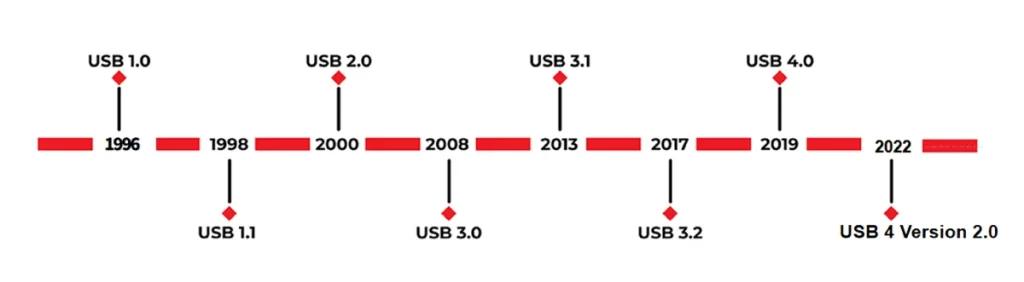
- USB 1.0 (1996): Offering modest data rates, it laid the groundwork for a universal connector.
- USB 2.0 (2000): Introduced “Hi-Speed” at 480 Mbps, significantly boosting adoption.
- USB 3.0 (2008): A major leap with “Super-Speed” at 5 Gbps.
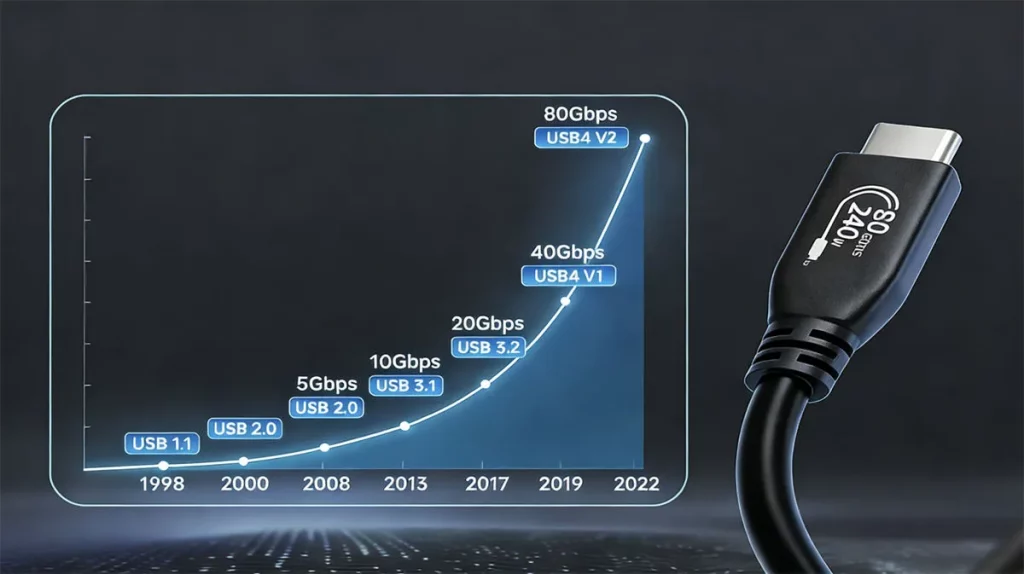
- USB 3.1 (2013) & USB 3.2 (2017): Further increased speeds to 10 Gbps and 20 Gbps, respectively, though accompanied by confusing naming conventions.
- USB 4 (2019): The latest iteration, built on Thunderbolt 3 technology, offers a new level of performance and convergence.
- USB4 Version 2.0 (2022): Further enhanced speeds, pushing capabilities to 80 Gbps and even 120 Gbps.
USB Standards Timeline
To visualize the progression and key milestones in USB technology development, here is a detailed USB standards timeline.
USB Standards Rate Development Chart
To illustrate the evolution of USB technology and its increasing data transfer capabilities over time, please refer to the following USB rate development chart.
Why comparing USB 3.0 and USB 4.0 matters
With connected devices becoming increasingly data-intensive, from 4K/8K video workflows to high-speed external SSDs. The choice of USB standard directly impacts efficiency and productivity. Understanding the distinct capabilities of USB 3.0 and USB4 is vital for consumers and businesses alike to invest in compatible hardware that meets current and future connectivity demands.
What Is USB 3.0
Definition
USB 3.0, also known as SuperSpeed USB, is the third major version of the Universal Serial Bus (USB) standard, released in November 2008. USB 3.0 was a quantum leap over USB 2.0. It introduced a 5 Gbps signaling rate and a distinct blue internal plastic to differentiate it from its predecessors.
Naming conventions
The USB Implementers Forum (USB-IF) has revised USB 3.0’s naming multiple times, leading to considerable confusion. Initially known as USB 3.0, it was later rebranded as USB 3.1 Gen 1 and is currently designated as USB 3.2 Gen 1. For clarity, products often use marketing terms like “SuperSpeed USB 5 Gbps.”
USB 3.0 = USB 3.1 Gen 1 = USB 3.2 Gen 1.
All these terms refer to the same 5 Gbps standard.
Applications and device compatibility
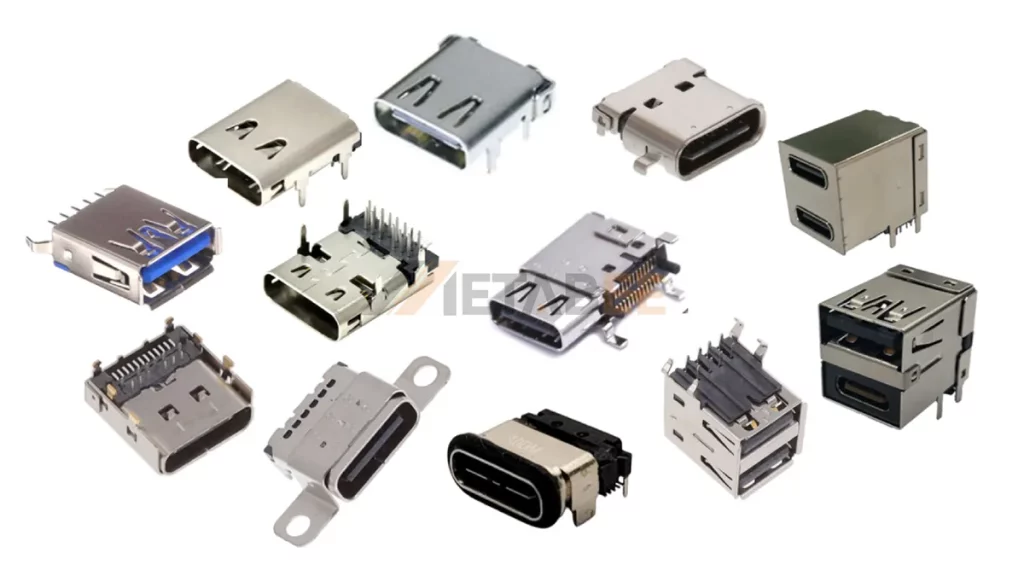
USB 3.0 is the “workhorse.” So it is prevalent across a vast range of electronics, including desktop computers, laptops, external hard drives, solid-state drives (SSDs), flash drives, printers, and various peripherals. It supports a variety of USB connector types, including USB-A, USB-B, Micro-B, and USB-C, and maintains backward compatibility with USB 2.0 devices.
What Is USB 4.0
Definition
USB 4.0, referred to simply as USB4, was officially announced in 2019 and is the latest major iteration of the USB standard. It represents a paradigm shift because it is built upon the Thunderbolt 3 protocol, which Intel contributed to the USB-IF to standardize high-speed data transfer. It unifies high-speed data, video, and power over a single interface built around the USB-C connector.

Naming conventions
USB-IF features a clearer marketing approach for USB4 products. Devices are typically labeled as:
- USB4 20Gbps: For products supporting data transfer speeds up to 20 Gbps.
- USB4 40Gbps: For products supporting data transfer speeds up to 40 Gbps.
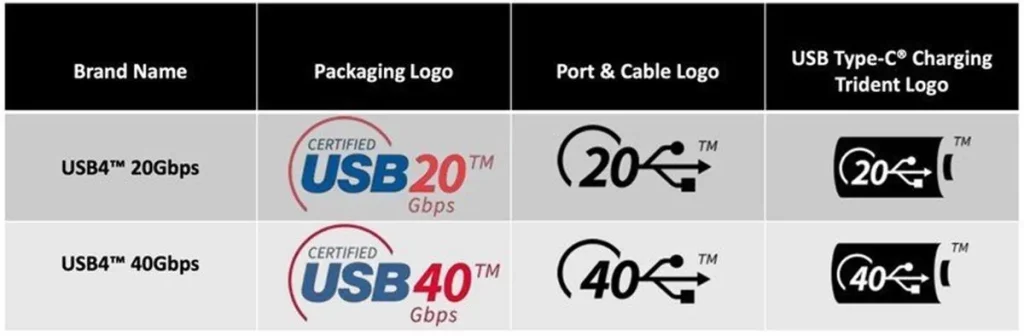
Tips: The recent USB4 Version 2.0 specification, introduced in 2022, further extends capabilities to 80 Gbps symmetric connections and even asymmetric connections supporting 120 Gbps in one direction and 40 Gbps in the other.
Integration with Thunderbolt technology
USB4 incorporates technology from Thunderbolt 3, enabling it to achieve similar high throughput and support for multiplexed data/video/power. While USB4 is based on Thunderbolt 3, not all USB4 devices will offer the full feature set of Thunderbolt. Thunderbolt 4 certification enforces stricter feature requirements. This means all Thunderbolt 4 devices are essentially high-end USB4 devices, but not all USB4 devices are Thunderbolt 4 certified.
If you would like to learn more about USB4, please refer to the relevant post.
USB 3.0 vs. USB 4.0: Side-by-Side Technical Comparison
When comparing USB 3.0 and USB 4 on a technical level, the differences extend beyond just raw speeds—they reflect a generational shift in how data, video, and power are transported, managed, and optimized across modern devices.
Data Transfer Speeds
One of the most significant differences between the two standards is data throughput:
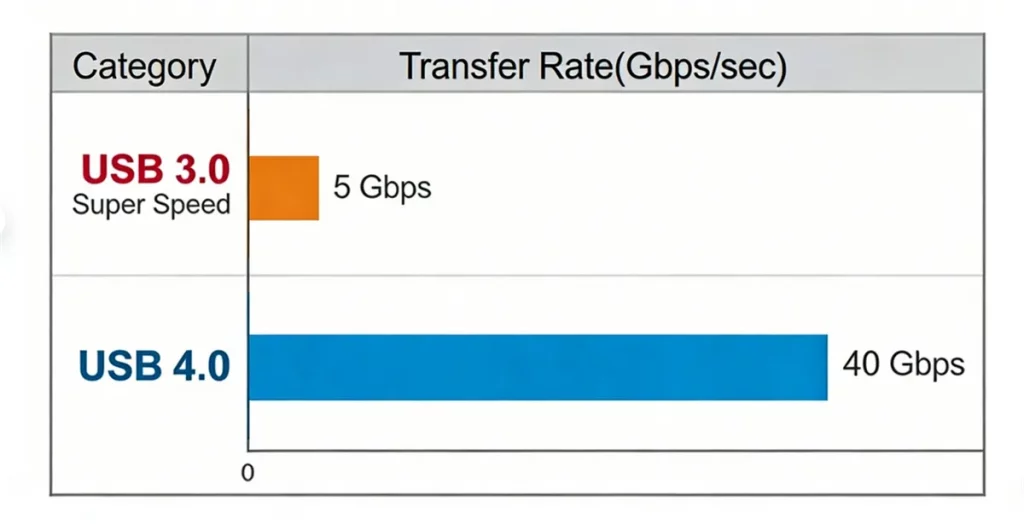
USB 3.0 supports a theoretical maximum SuperSpeed transfer rate of 5 Gbps—approximately ten times faster than USB 2.0—through a dual-unidirectional physical layer that enables simultaneous send and receive streams.
USB 4.0 expands this dramatically. Based on the Thunderbolt 3 protocol and USB-IF specifications, USB 4.0 supports data rates of up to 40 Gbps.
Key Takeaways:
- USB 3.0 maximum is 5 Gbps.
- USB 4.0 has defined tiers at 20 Gbps and 40 Gbps, enabling far faster transfer for high-performance workflows.
- USB 4.0 is roughly 8 times faster than USB 3.0. A 10GB file that takes 20 seconds on USB 3.0 would take less than 3 seconds on USB4.
Connector Universality
USB connector interface type has a direct impact on usability and device compatibility.
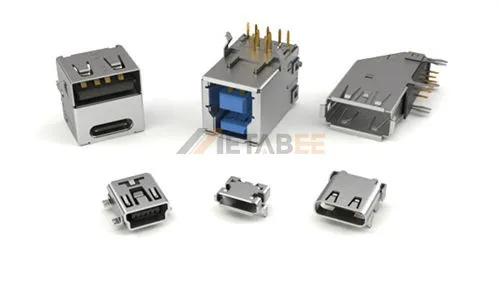
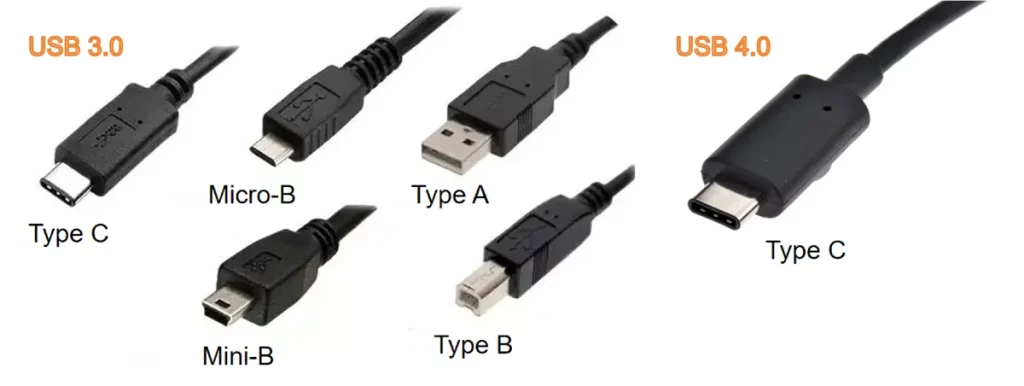
USB 3.0 supports multiple connector form factors (Type-A, Type-B, Type-C, Micro-B, and Mini-B), depending on device implementations. USB4 standardizes on only the USB-C connector for all implementations. The reversible connector is now ubiquitous across mobile, laptop, and peripheral ecosystems. This shift to a single connector simplifies cable management and reduces consumer confusion while enabling advanced signaling and feature support through the USB-C interface.
Power Delivery
Both standards support USB Power Delivery (USB PD), but USB 4.0’s implementation is inherently more advanced and integrated.
- USB 3.0 supplies up to 900 mA at 5 V (≈ 4.5 W) unless augmented by optional battery charging standards.
- USB 4 enables USB PD 3.1 compliance, with potential power delivery up to 240 W (5 A at 48 V) when paired with USB-C PD controllers and certified cables.
- USB 4’s enhanced power profile supports charging larger systems like laptops and monitors, far beyond the more peripheral-focused power of USB 3.0.
Multimedia Capabilities
The ability to transmit video and audio signals differs significantly, particularly for high-resolution, multi-display setups.
- USB 3.0 relies on DisplayPort Alternate Mode or HDMI Alt Mode to transmit video signals over the USB-C connector. While capable of supporting a single 4K display, it has limited bandwidth when attempting to drive multiple high-resolution displays simultaneously.
Bandwidth Management
USB 4.0 introduces a more intelligent approach to bandwidth allocation.
- USB 3.0: Operates with fixed lanes for data transfer. The bandwidth for data and display signals is often separate. Performance will degrade when both high data transfer and high-resolution display output are active.
- USB 4.0: Features dynamic bandwidth allocation. This means the 40 Gbps aggregate bandwidth can be intelligently divided between data traffic and display traffic. This flexibility ensures optimal performance for various mixed-usage scenarios.
Backward Compatibility
USB 3.0 offers excellent backward compatibility with USB 2.0 and USB 1.1 devices. USB 4.0 maintains strong backward compatibility with previous USB standards (USB 3.2, USB 2.0) and, critically, with Thunderbolt 3. This ensures that existing USB and Thunderbolt 3 devices can be connected to a USB4 port, providing a high degree of interoperability.
Cost and Market Adoption
The maturity and performance benefits of each standard influence their cost and prevalence.
- USB 3.0 is a mature and widely adopted standard. Devices and cables are generally more affordable and readily available. Its widespread presence means most current computing devices, peripherals, and accessories support some form of USB 3.0.
Quick Comparison Table
To help you quickly grasp the differences and choose the right technology for your needs, the following table provides a concise key comparison summary of USB 3.0 and USB 4.0.
| Feature | USB 3.0 | USB 4.0(USB4) |
| Max Transfer Speed | 5 Gbps | Up to 40 Gbps |
| Connector Type | Type-A, Type-B, Mini-B, Micro-B, Type-C | Type-C Only |
| Power Delivery | Up to 4.5W (Standard) | Up to 100W/240W (with USB-PD) |
| Protocol | USB Only USB, | PCIe, DisplayPort |
| Display Support | Limited (via Alt Mode) | Dual 4K or Single 8K |
| Thunderbolt | No | Compatible with TB3/TB4 |
| Bandwidth Management | Static | Dynamic (Allocates based on need) |
| Backward Compatibility | USB 2.0/1.x | USB 3.x/2.0 |
| Cost and Market Adoption | Affordable | More Expensive |
Specification
In this section, we list the USB 3.0 specification and USB 4.0 specification, enabling a clear side-by-side understanding of their capabilities and limitations based on the official standards and industry data.
| Feature | USB 3.0(SuperSpeed USB) | USB 4.0(USB4) |
| Max Transfer Speed | 5 Gbps | Up to 40 Gbps |
| Connector Type | Type-A, Type-B, Mini-B, Micro-B, Type-C | Type-C Only |
| Power Delivery | Up to 4.5W (Standard) | Up to 100W/240W (with USB-PD) |
| Mounting Feature | Vertical/Horizontal | |
| Shell Material | Stainless Steel | |
| Shell plating | Nickel Plated | |
| Contact | Copper Alloy/Phosphor Bronze | |
| Contact plating | Gold plated | |
| Insulator | Hi-Temp Thermoplastic | |
| Shielding | Shielded | |
| Mating Cycles | 10000 Times | |
| Flammability Rating | UL94 V-0 | |
| Operating Temperature | -40°C to 85°C | |
Choosing Between USB 3.0 and USB 4.0
When USB 3.0 Is Sufficient
USB 3.0 remains a highly capable and cost-effective solution for a wide range of applications. It is perfectly sufficient when:
- Budget Constraints: USB 3.0 cables and hubs are significantly cheaper to manufacture and purchase.
- Simple Peripherals: For keyboards, mice, and standard office printers, the 40 Gbps speed of USB4 is wasted.
- Low power requirements: for charging smartphones, tablets, or small accessories, USB 3.0’s power delivery is sufficient.
- Legacy Systems: If your factory or office uses older computers with Type-A ports, USB 3.0 remains the standard.
When USB 4.0 is Worth the Upgrade
Upgrading to USB4 becomes a compelling choice for users and professionals demanding peak performance, versatility, and future-proofing:
- High-speed data transfer: Essential for tasks involving large files, such as 4K/8K video editing, large dataset transfers, or high-performance external storage.
- Advanced display connectivity: If you need to connect multiple high-resolution monitors (e.g., dual 4K displays) or an 8K display to a single port, USB4’s multimedia tunneling capabilities are invaluable.
- Consolidating ports with docking stations: USB4 excels with universal docking solutions that handle data, video, and power delivery simultaneously, reducing cable clutter.
- Future-proofing your setup: As new devices increasingly adopt USB4, investing in this standard ensures compatibility with upcoming technologies and higher performance.
- Powering high-wattage devices: With support for up to 240W, USB4 can efficiently charge laptops, gaming devices, and other power-hungry electronics.
Future Trends and Developments
The roadmap for USB is clear: higher speeds and higher power.
The USB 3.0 development path is complete. USB 4.0 represents the foundation for future high-speed, multi-functional connectivity. Emerging revisions to USB 4 (including USB4 2.0) aim for even higher bandwidth (potentially up to 80–120 Gbps). Continued convergence with Thunderbolt technologies and unified logo schemes will simplify user understanding and procurement decisions.
Looking ahead, the USB standard is set to evolve significantly beyond USB 4.0’s current specifications. The USB ecosystem continues to evolve, strengthening USB-C’s role as a universal connectivity standard.
Conclusion
The evolution from USB 3.0 to USB4 marks a significant milestone in connectivity technology. USB 3.0 continues to meet a wide range of daily needs with its reliable 5 Gbps performance and broad compatibility. USB4 ushers in an era of 40 Gbps transfer speeds, enhanced versatility, and robust power delivery capabilities. It integrates Thunderbolt technology and utilizes the USB-C connector.
For those engaged in high-bandwidth applications, multimedia production, or seeking a future-proof solution, USB4 offers compelling advantages. Understanding these technical distinctions empowers users and businesses to make strategic choices, ensuring their connectivity infrastructure aligns with their operational demands and future growth.
Related Products
- USB Connectors
- USB 4.0 Type C
- Micro USB 3.0 Type B
- USB 3.0 Type A
- USB 3.0 Type B
- USB 3.1 Type-C
FAQs
Q1: Can I use a USB 3.0 device with a USB4 port?
A: Yes. USB4 is fully backward compatible with USB 3.x and USB 2.0. However, the USB 3.0 device will operate at its maximum speed of 5 Gbps, not the higher speeds of USB4.
Q2: Are all USB-C cables USB4 compatible?
A: No. While USB4 exclusively uses the USB-C connector, not all USB-C cables are designed to support USB4 speeds or features. For full USB4 performance, you need certified USB4 cables.
Q3: Does USB4 require Thunderbolt support?
A: USB4 can optionally support Thunderbolt protocol features, but Thunderbolt certification is separate and not mandatory for all USB4 devices.
Q4: Do I need a special cable for USB 4.0?
A: Yes. To achieve 40 Gbps, you must use a certified USB4 or Thunderbolt 4 cable. A standard USB-C charging cable will usually only provide USB 2.0 or 3.0 speeds.
Q5: What’s the difference between USB4 and Thunderbolt 4?
A: USB4 is based on the Thunderbolt 3 protocol. Thunderbolt 4 is an implementation of USB4 that mandates a stricter set of minimum capabilities, including support for dual 4K displays and specific PCIe bandwidths, making it a premium tier of USB4.
Q6: Can USB4 power my laptop?
A: Yes. USB4 supports USB Power Delivery, with standard capabilities up to 100W, and up to 240W with the Power Delivery 3.1 Extended Power Range. Many laptops can be charged via a USB4 port and a compatible cable/charger.

As we evaluate the roadmap for our next-generation industrial workstations, this technical breakdown of USB 3.0 versus USB4 is invaluable. The leap to a 40Gbps minimum bandwidth and the mandatory USB-C architecture in USB4 represents a significant shift for our high-speed data acquisition modules. Understanding the integration of Thunderbolt 3 protocols helps us justify the transition to USB4 to ensure our hardware remains future-proof and compatible with high-performance peripherals.