

As data-intensive applications like Artificial Intelligence (AI), high-resolution machine vision, and edge computing evolve, the demand for robust interconnects grows exponentially. Engineers now require solutions that handle massive throughput without latency while enduring harsh industrial environments. The era of waiting for data transfer is over; instantaneity is the new benchmark.
The introduction of the USB4 standard marked a pivotal shift in the connectivity landscape. It moved the industry beyond the fragmented and often confusing landscape of previous generations (USB 3.0, 3.1, 3.2). This new USB4 Type-C convergence handles data, display, and power within a single, unified interface. However, for hardware engineers and system integrators, implementing a USB4 connector is not merely a drop-in replacement. It requires a deep, physics-level understanding of signal integrity, thermal management, and strict compliance standards.
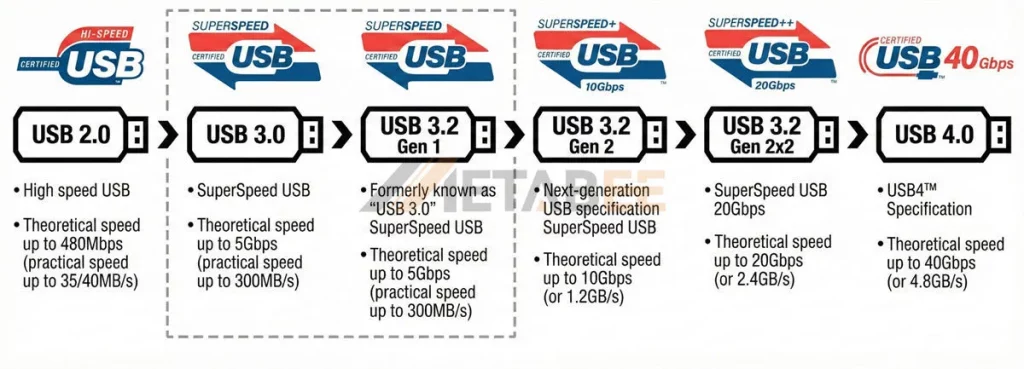
This article explores the technical architecture of USB 4 Type-C connectors. We will also analyze the critical differences when comparing USB4 40Gbps vs Thunderbolt 4. Furthermore, we will explain why selecting the right component—from a trusted partner like Metabee—is crucial for next-gen device reliability.
Understanding the Core Specs: What Defines “True” USB4 40Gbps?
At the physical layer, the transition to 40Gbps represents a doubling of the maximum bandwidth available in USB 3.2 Gen 2×2. Industry professionals often refer to this high-performance specification as USB 4.0 Gen 3 Type-C or simply USB Type-C 4.0. This leap is not just about raw speed; it achieves its performance through dual-lane operation over the existing Type-C cabling infrastructure, necessitating precision engineering in the contact design.
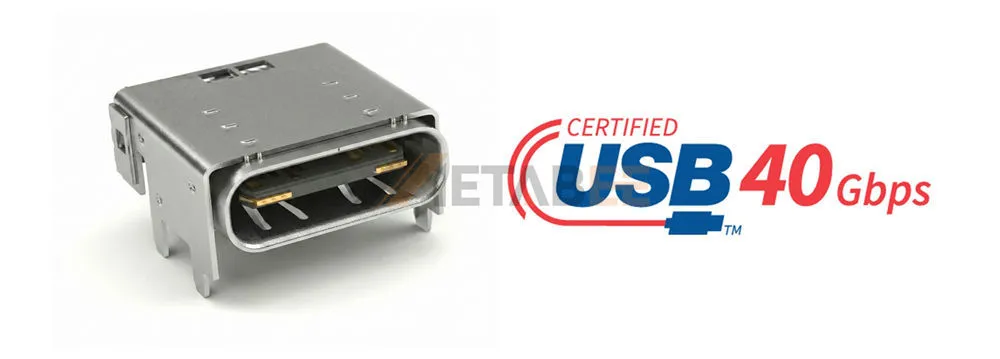
Key Technical Pillars:
Dual-Lane Architecture
Unlike previous iterations that might use a single lane for data, USB 4.0 Gen 3 Type-C mandates the use of two lanes (Tx1/Rx1 and Tx2/Rx2). These lanes operate simultaneously to achieve the 40Gbps aggregate bandwidth. This requires the connector to maintain near-perfect alignment and impedance matching across all four high-speed differential pairs.
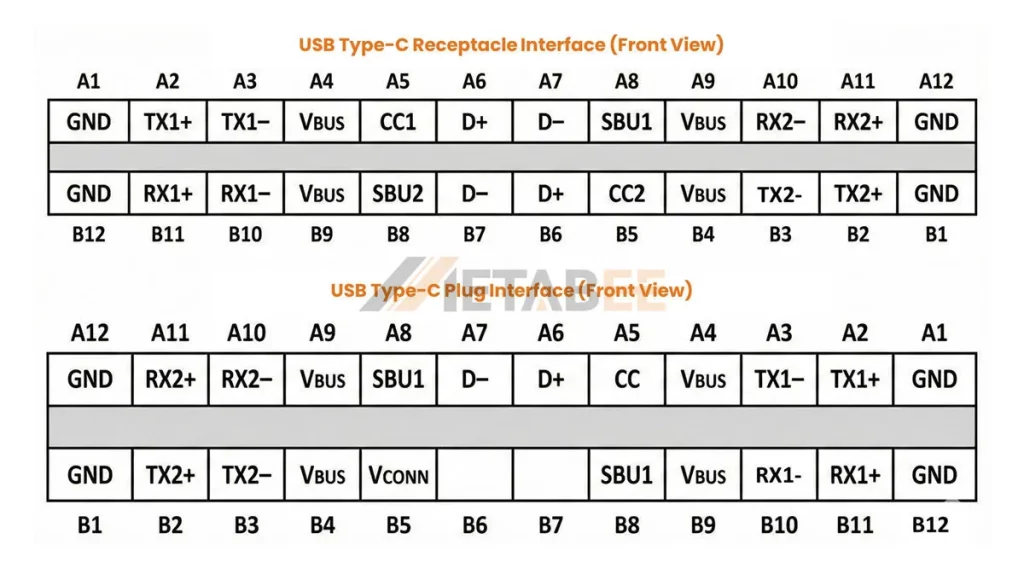
Tunneling Architecture
USB4 introduces a revolutionary protocol-tunneling architecture. It dynamically allocates bandwidth between USB 3.2 data, DisplayPort 1.4a/2.0 video, and PCIe signals.
- Real-World Benefit: If a user is driving a 4K monitor that consumes 10Gbps of bandwidth, the remaining 30Gbps is intelligently allocated to file transfers or PCIe devices. This allows a single connector to drive an external GPU (eGPU) while transferring file data at the same time, maximizing efficiency.
Power Delivery (PD) & Safety
While speed is the headline, power is the backbone. Premium connectors often support USB PD 3.1 Extended Power Range (EPR). This capability allows for a USB 40Gbps 240W configuration (48V/5A).
- Engineering Note: To handle 240W safely, the connector must work in tandem with an E-Marker chip in the cable. This chip communicates with the source and sink to confirm cable capabilities before allowing high-current modes, preventing overheating or fire risks in legacy cables.
Related Post: A Technical Deep Dive into USB Connector Architectures, Pinouts, and Signal Integrity
Critical Design Challenges in 40Gbps Implementation
For connector manufacturers and PCB designers, the jump to 40Gbps introduces significant physics-based challenges. At these frequencies, a USB 4 connector serves as a critical transmission line rather than just a mechanical join. Any impedance mismatch acts as a barrier, reflecting signal energy back to the source.
1. Signal Integrity (SI) & Material Science
Engineers must manage insertion loss and return loss at 10GHz+ frequencies. The internal structure needs a strict differential impedance (typically 85-90 Ohms) to minimize signal reflection.
- Challenge: Standard insulation materials used in USB 2.0 connectors can cause high dielectric loss at 40Gbps frequencies.
- Solution: High-end manufacturers utilize Liquid Crystal Polymer (LCP) for the insulator housing. LCP offers a low dielectric constant and excellent dimensional stability during reflow soldering, ensuring the contacts remain perfectly positioned to maintain signal integrity.
2. EMI/RFI Mitigation
High-frequency data transmission creates significant Electromagnetic Interference (EMI). This notoriously interferes with sensitive wireless components, particularly 2.4GHz Wi-Fi and Bluetooth signals.
- Solution: High-quality USB 4 Type-C connectors utilize deep-draw stainless steel shells rather than stamped parts. This is a standard in Metabee’s manufacturing process, where we integrate grounding fingers (spring contacts) to create a 360-degree shield. This effectively contains EMI and ensures the final device passes strict FCC/CE compliance testing.
3. Thermal Management
With the capability to deliver up to 5A of current, contact resistance becomes a critical factor. Even a small increase in resistance can generate significant heat (Power= I2*R).
- Solution: We use high-conductivity copper alloys for contacts, often plated with automotive-grade gold. Maximizing the physical contact area reduces resistance and keeps temperature rise within industry standards (typically ∆T < 30℃). Furthermore, “hybrid” mounting designs (SMT pins for data, Through-Hole legs for the shell) help conduct heat away from the connector body into the PCB ground plane.
Comparative Analysis: USB4 vs. Thunderbolt 4
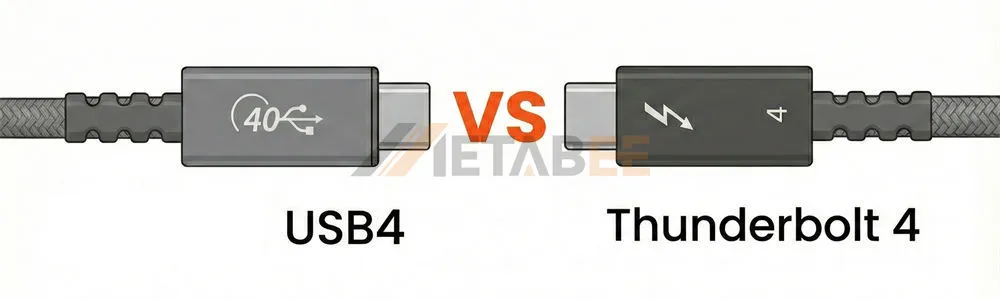
One of the most common questions from procurement teams involves the choice between protocols. When evaluating USB 4 vs Thunderbolt 4, distinctive differences emerge that impact cost and certification strategy.
While both standards share the same underlying protocol architecture (based on Intel’s Thunderbolt 3), they differ in certification and minimum requirements.
| Feature | USB4 | Thunderbolt 4 |
| Interface | USB-C | USB-C |
| Maximum Supported Bandwidth | 40 Gbps | 40 Gbps |
| Minimum Supported Bandwidth | 20 Gbps (Gen 2×2) | 40 Gbps |
| Minimum Video Support | Single Display Output without minimum resolution requirement | Double 4K or Single 8K Display Output |
| Minimum Power Supply ( for laptop) | 7.5W | 15W |
| Maximum Power Supply (for docks and hubs) | 100W | 100W |
| PCIe Support | Optional | Mandatory (32 Gbps) |
| Daisy Chaining | Optional | Mandatory |
| Certification Cost | Standard USB-IF Compliance | Higher (Intel Certification) |
| Backward Compatibility | USB 3.2, USB 3.0, USB 2.0, Thunderbolt 3 | Thunderbolt 3, USB4, USB 3.2, USB 3.0, USB 2.0 |
The Engineer’s Takeaway: A high-quality USB 4.0 Gen 3 Type-C connector is often physically identical to a Thunderbolt 4 connector in terms of pinout and materials. If your device requires 40Gbps throughput and PCIe tunneling but you wish to avoid strict Thunderbolt licensing costs and branding requirements, a certified USB4 connector serves as the optimal choice. It offers the same top-tier performance flexibility with a more open ecosystem.
Key Application Trends for USB4 Connectors
The adoption of USB 4 Type-C interfaces is expanding beyond consumer laptops into rugged, industrial, and automotive sectors:
- AI & Edge Computing: Mobile workstations and industrial box PCs utilize these connectors to link with external AI accelerators (TPUs/NPUs). This enables rapid local processing of large datasets without the latency of uploading to the cloud.
- Machine Vision Systems: In automated manufacturing, cameras require massive bandwidth to stream uncompressed 4K/8K video for real-time defect detection. USB4 provides the necessary pipe, replacing proprietary cabling solutions with a standard, low-cost interface.
- Medical Imaging: Portable ultrasound and MRI devices rely on USB 40Gbps 240W capabilities. This allows a single cable to transmit high-fidelity diagnostic images instantly to a workstation while simultaneously powering the medical device, reducing cable clutter in sterile environments.
- Automotive Infotainment (IVI): As cars become data centers on wheels, USB4 is entering the cabin. It connects rear-seat entertainment screens and mobile device integration hubs, supporting the high bandwidth needed for concurrent video streaming and fast charging of passengers’ devices.

How to Select the Right Connector Manufacturer
When sourcing a USB 4 connector, verify the following points to ensure long-term reliability and manufacturing success:
- USB-IF Certification (TID): Always ask for the Test ID (TID). This guarantees the connector has passed rigorous electrical and mechanical compliance tests. Metabee is proud to offer fully certified USB4 solutions that meet these stringent TID requirements, ensuring seamless integration for your engineers.
- Durability Ratings & Plating: Look for connectors tested to 10,000 mating cycles. For industrial applications, inquire about the gold plating thickness on the contact mating area. While “Flash Gold” is common in consumer electronics, Metabee often recommends and supplies specs requiring 30µ” (micro-inches) of gold to prevent oxidation and fretting corrosion over years of use.
- Mounting Options for Mechanical Strength:
- Top-Mount: Standard for most PCBs, easy to inspect.
- Mid-Mount: Sinks the connector into the PCB cutout. This reduces the overall z-height (perfect for ultra-thin devices) and provides superior resistance to vertical prying forces.
- Vertical: Used in docking stations and test equipment.
Conclusion
The transition to USB4 40Gbps represents more than a speed upgrade. It is a fundamental shift in how devices communicate, display, and power themselves. For OEMs, selecting the right connector ensures signal integrity, thermal efficiency, and robust EMI shielding. This prevents field failures and streamlines certification success.
In the high-stakes world of electronics, the USB4 Type-C connector is the critical bridge between potential and performance. Partnering with a dedicated specialist like Metabee ensures that this bridge is built to last.
Our engineering team specializes in high-frequency interconnect solutions. Whether you need a standard receptacle, a custom IP67-rated waterproof assembly, or specific advice on PCB layout for 40Gbps traces, we can help.
Contact us today to request 40Gbps USB connector samples and datasheets.
Frequently Asked Questions (FAQ)
Q1: Are USB4 connectors backward compatible with older USB standards?
A: Yes, they are fully backward compatible with USB 3.2, USB 2.0, and even Thunderbolt 3. However, data transfer speeds will default to the maximum speed supported by the host, device, and cable (e.g., 480Mbps for USB 2.0).
Q2: What is the maximum cable length for 40Gbps transmission?
A: To maintain the full 40Gbps throughput, passive cables are typically limited to 0.8 meters (approx. 2.6 ft). For longer distances (up to 2m), active cables with re-timer chips are required to boost the signal.
Q3: Do Metabee’s USB4 connectors support the new 240W EPR charging standard?
A: Yes. Our high-performance USB4 connectors are engineered to handle the USB PD 3.1 standard, supporting up to 48V/5A (240W). They utilize high-conductivity copper alloys to manage thermal rise effectively during high-power charging.
Q4: Can I use a USB4 connector for a Thunderbolt 4 application?
A: Generally, yes. USB4 Gen 3×2 connectors share the same physical specifications and pinout as Thunderbolt 4 connectors. However, if your end-product requires the “Thunderbolt” logo, you must pass Intel’s specific certification process.
Q5: How does the PCB layout affect USB4 performance?
A: Significantly. At 40Gbps, even minor impedance mismatches can cause signal reflection. Designers must strictly control differential impedance (85-90Ω), minimize via stubs, and ensure trace lengths are matched. Metabee can provide layout guidelines to assist your design team.
Q6: What is the difference between USB4 Gen 2×2 and Gen 3×2?
A: The main difference is speed. Gen 2×2 offers a maximum of 20Gbps, while Gen 3×2 (the focus of this article) supports the full 40Gbps. When specifying components, always confirm the “Gen” rating to ensure you are getting the bandwidth you expect.

Pingback: USB 3.0 vs 4: Technical Differences You Must Know Before Buying - MetabeeAI