
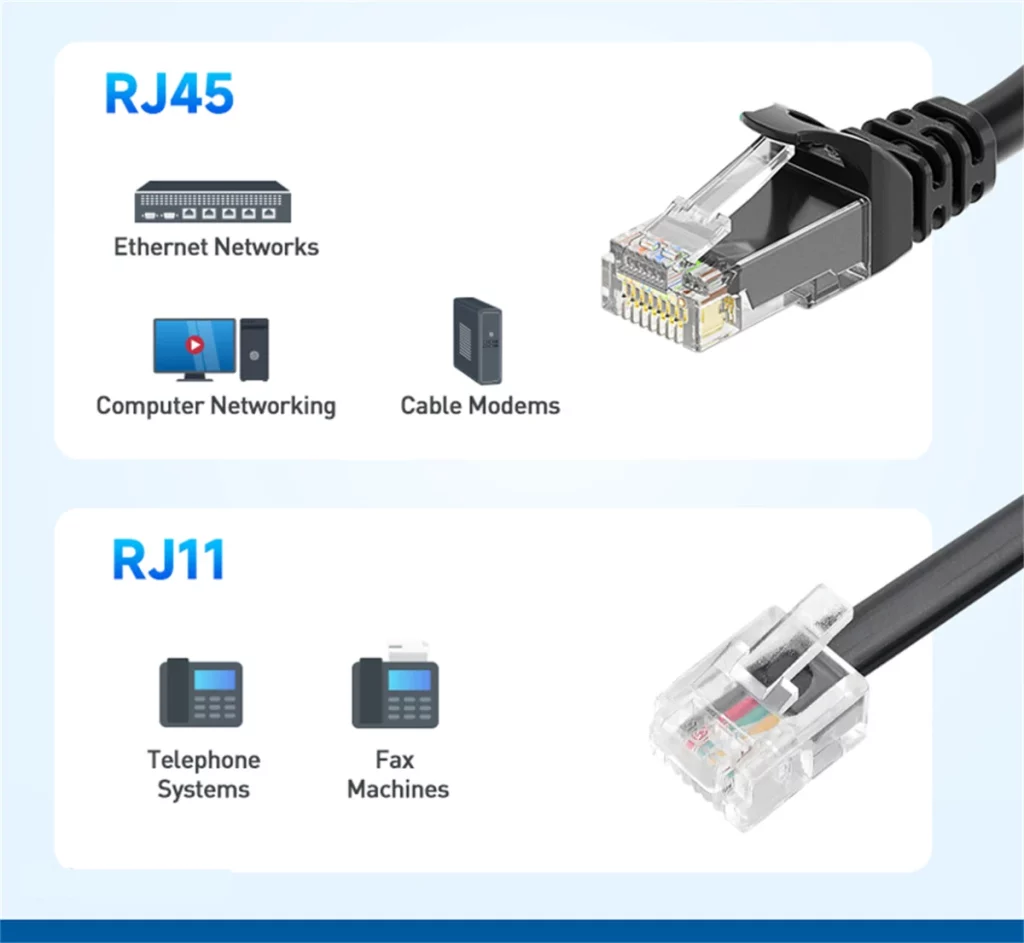
Have you ever tried to plug a cable into a device, only to find it doesn’t quite fit, despite looking almost identical? This common frustration often boils down to the subtle yet critical differences in the RJ11 vs RJ45 debate. While both are types of registered jack connectors, they serve entirely different purposes. You might find an RJ11 port on your landline telephone, designed for voice communication. In contrast, the larger RJ45 modular plug is the standard for Ethernet networking, connecting your computer to a router for internet access.
From the number of pins and physical dimensions to the internal wiring standards, they have fundamental differences. Using them interchangeably will not only fail to establish a stable network connection, but even risks damaging the equipment. This article will delve into the key differences between them in terms of size, wiring, and specific applications, and explain exactly why these two connectors are not interchangeable.
Introduction
To understand the rivalry of RJ11 vs RJ45, we first need to understand what “RJ” stands for. It means Registered Jack, a standardized telecommunication network interface used for connecting voice and data equipment. The number following “RJ” refers to the specific wiring standard and physical construction.
What is RJ11 Connector?
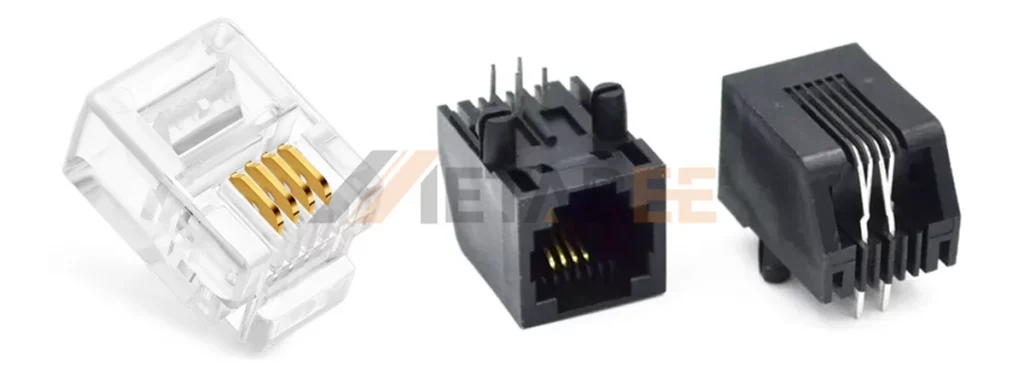
The RJ11 is the connector you grew up seeing on landline telephones. What is rj11 used for primarily? It is the global standard for analog voice lines and DSL broadband internet connections. From the outside, it is a small square plug.
Technically speaking, an RJ11 connector is typically a 6P4C interface (6 positions, 4 contacts). However, in practical single-line telephone applications, only the middle two contacts (Pin 3 and Pin 4) are used to transmit the telephone signal, thus forming a 6P2C variant. It supports handling low-bandwidth signals and the voltage associated with voice communication. Because it uses fewer wires, it is smaller and simpler than the RJ45 connector.
What Is an RJ45 Connector?
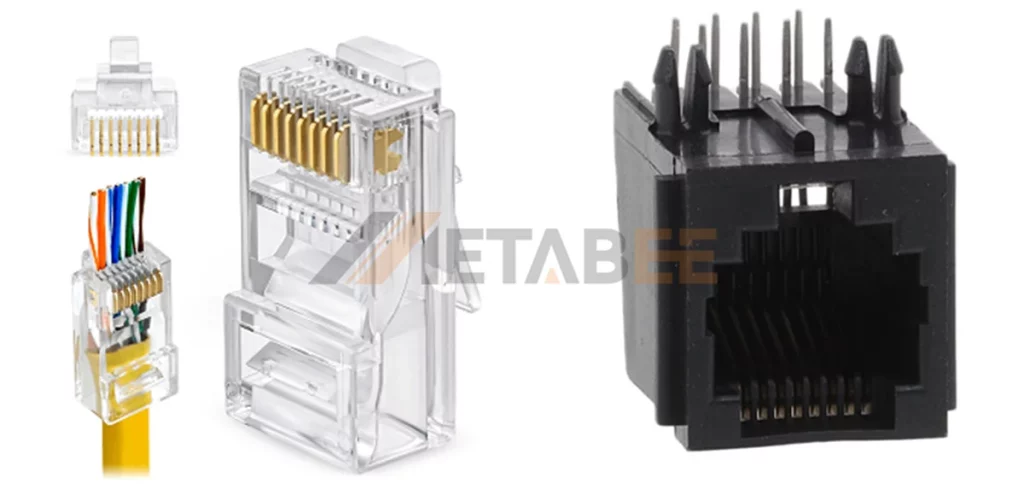
An RJ45 connector is a standardized 8-pin (8P8C) modular interface designed specifically for high-speed Ethernet data. It is engineered to terminate twisted copper wire cables, such as Cat5e, Cat6, and Cat7. To accommodate the four pairs of wires (8 strands) required for these cables, the RJ45 is physically wider and has more pins than the standard RJ11. In modern networking, the RJ45 connector is the gold standard for wired connections. It links devices like PCs and consoles to the internet, minimizing interference to ensure stable Gigabit speeds.
Difference between RJ11 and RJ45
When comparing difference between rj11 and rj45, it is not just about one being “bigger” than the other. The differences span physical dimensions, electrical capabilities, and data protocols. Understanding these distinctions is critical to avoiding hardware damage.
Size and Shape
The most immediate and obvious difference is physical size.
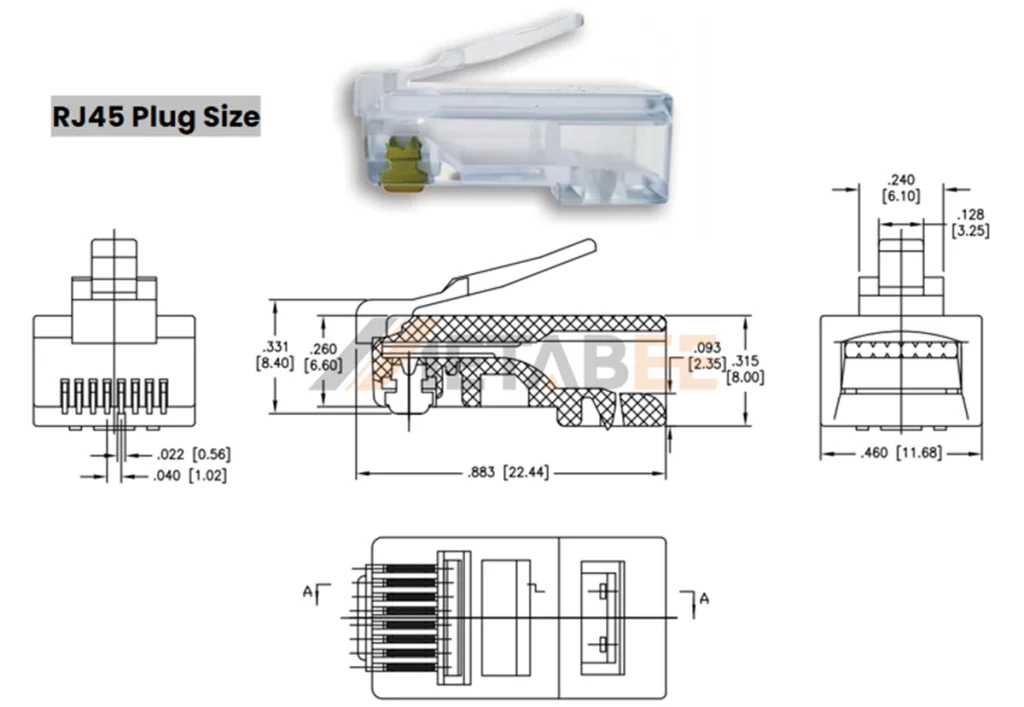
- RJ45: Noticeably wider and more rectangular. The standard rj45 plug size is approximately 11.68mm wide.
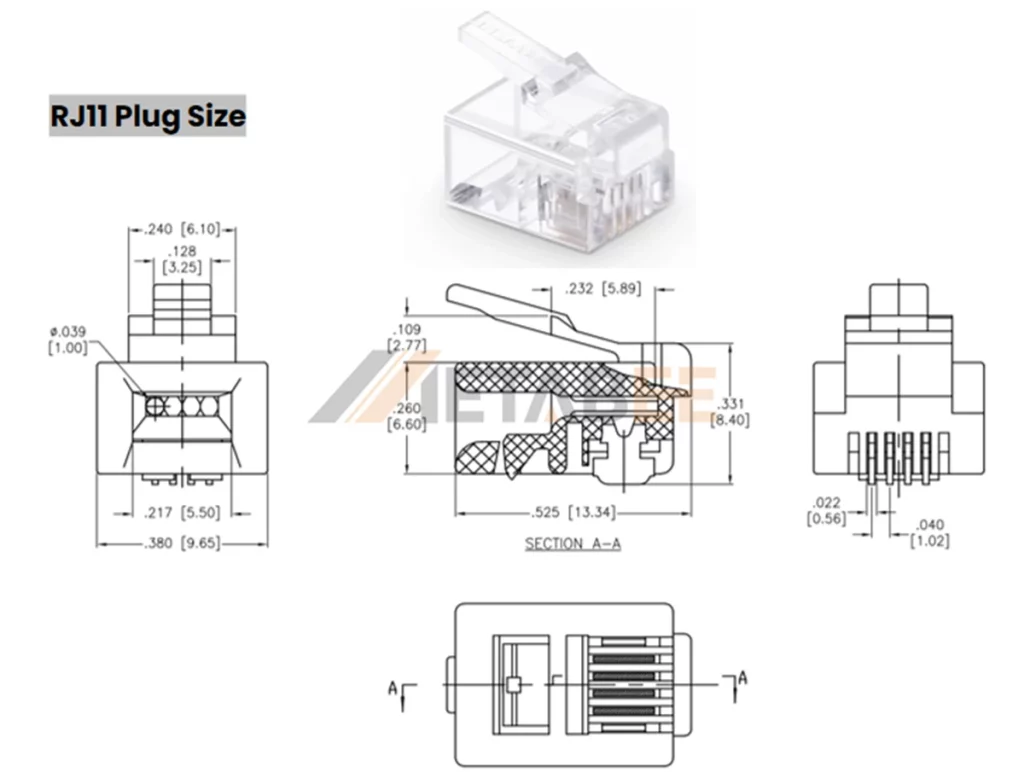
- RJ11: More compact and squarish, measuring about 9.65mm wide.
This size difference is by design to prevent accidental cross-connection between data and telephone networks. You simply cannot fit a wide RJ45 plug into a narrow rj11 port.
Number of Pins
To truly understand the difference between rj11 and rj45, you must look at the technical notation: “P” stands for Positions (slots for wires), and “C” stands for Contacts (actual metal pins).
- RJ11 (6P4C): It has 6 distinct “positions” (slots where wires could go), but usually, only 4 (or sometimes 2) “contacts” are populated with copper pins. The outer slots are often empty.
- RJ45 (8P8C): This connector has 8 positions and 8 metal contacts. While users often ask how many types of rj45 connectors are there, the standard for Ethernet is almost always 8P8C—meaning every single slot is populated with a pin.
Why does this matter?
The pin count dictates performance. The RJ45 connector needs all 8 pins to transmit data across 4 twisted pairs of copper wire. This density allows it to handle Gigabit speeds and technologies like Power over Ethernet (PoE), whereas the 4-pin RJ11 is limited to low-speed voice or DSL signals.
Use & Application
The battle of RJ11 vs RJ45 is ultimately defined by what flows through the cables: RJ11 carries analog voice signals, while RJ45 transmits high-speed digital data.
What Is RJ11 Used For?
The RJ11 is the standard registered jack for low-bandwidth communication. It is designed to bridge the gap between your home and the public telephone network.
- Analog Voice: Traditional landline telephones and fax machines.
- DSL Broadband Internet: The connection from your wall jack to your modem uses RJ11 because DSL signals run over copper telephone lines.
What Is RJ45 Used For?
The RJ45 connector is the workhorse of modern networking (LANs). It utilizes 8 wires to reduce noise and maximize speed. It is used for:
- Computer Networking: Connecting PCs, laptops, and game consoles to routers.
- IP Devices & PoE (Power over Ethernet): RJ45 connectors support PoE technology, which allows a single twisted copper wire cable to transmit both internet data and electrical power at the same time. This is why you can install IP security cameras in high corners or ceilings without needing a power outlet nearby—the network cable does all the work.
- VoIP Telephony: Connecting VoIP phones to make voice calls over the internet, rather than traditional telephone lines.
Comprehensive Comparison Table of RJ11 vs RJ45
| Feature | RJ11 Connector | RJ45 Connector |
|---|---|---|
| Full Name | Registered Jack-11 | Registered Jack-45 |
| Connector Structure | 6P4C (6 Positions, 4 Contacts) | 8P8C (8 Positions, 8 Contacts) |
| Physical Shape | Compact, Square | Wider, Rectangular |
| Physical Width | Approx. 9.65 mm | Approx. 11.68 mm |
| Cable Type | Flat Telephone Cable (2 pairs / 4 wires) | Twisted Pair Ethernet Cable (4 pairs / 8 wires) |
| Wiring Standard | Standard Telephone / USOC | T568A or T568B |
| Bandwidth / Speed | Low Speed (~24 Mbps) | High Speed (1 Gbps to 40 Gbps) |
| Primary Use | Analog Voice (Telephony), Fax, DSL | Digital Data (Ethernet), Networking, VoIP |
Compatibility and Interchangeability
Can you plug RJ11 into RJ45?
Technically, yes, an RJ11 plug is small enough to fit inside an RJ45 jack. However, you should never do this. Here is why:
- Pin Damage: The plastic housing of the smaller RJ11 connector is rigid. When inserted into the wider RJ45 jack, the plastic edges of the RJ11 plug press against the outer pins (Pins 1 and 8) of the RJ45 socket. This can bend or recess those pins, permanently ruining the RJ45 port.
- Signal Failure: Even if it fits, the wiring standards are incompatible. An Ethernet signal cannot travel over a telephone wire.
Can you plug an Ethernet cable into a phone jack?
No. The RJ45 connector is too wide to fit into an RJ11 port. You would break the port if you tried to force it.
Therefore, are RJ11 and RJ45 interchangeable? Absolutely not. They are physically distinct and electrically incompatible.
RJ11 vs RJ45 Pinouts and Wiring Diagram
The RJ11 Pinout
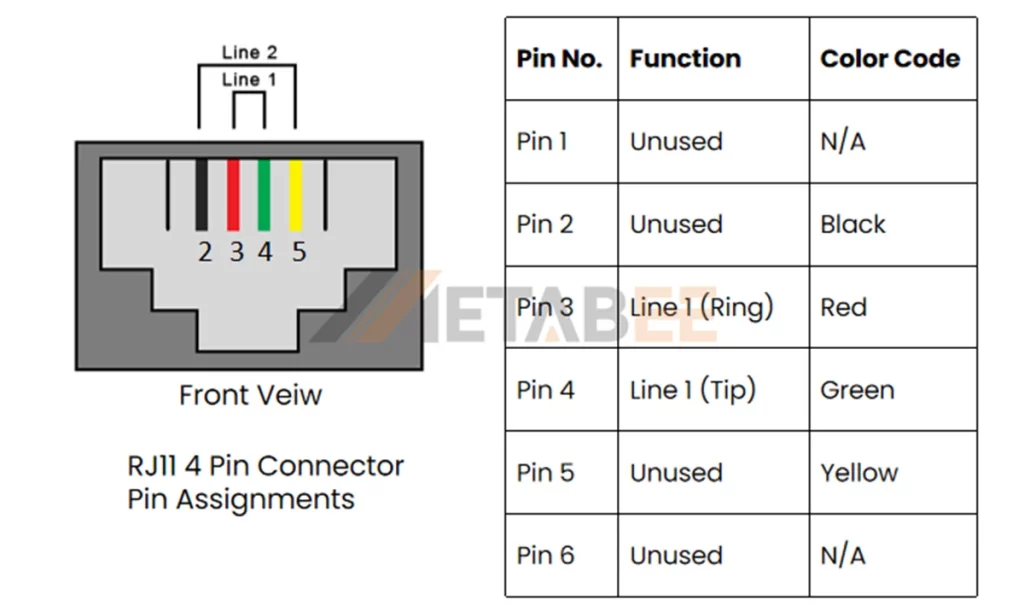
The rj11 wiring diagram is relatively simple compared to Ethernet. In a standard home phone line, you are dealing with two central wires (Tip and Ring).
- The Tip: This is the “grounded” side of the circuit.
- The Ring: This side carries a -48V DC voltage (when the phone is on the hook) and the AC ringing voltage (usually around 90V) to alert you of an incoming call.
RJ11 Color Code (Standard 4-wire phone cable):
- Pin 2: Black (Not always used)
- Pin 3: Red (Ring – Negative)
- Pin 4: Green (Tip – Positive)
- Pin 5: Yellow (Not always used)
In a 6-pin configuration, the center two pins (3 and 4) carry the primary voice line. If you have a second phone line, it travels on pins 2 and 5 (Black and Yellow).
Diagram showing RJ11 pinout with color codes
The RJ45 Pinout (T568A vs T568B)
The rj45 pinout is more complex because it involves 8 wires paired into 4 colors: Orange, Green, Blue, and Brown. There are two standards set by the TIA/EIA: T568A and T568B.
T568A vs T568B: Which one should you use?
T568B: This is the most common standard in the US and for commercial cabling. T568B is preferred for its superior signal isolation and enhanced protection against electromagnetic noise. It is the default choice for modern commercial and residential networks. If you are buying a cable off the shelf, it is likely T568B.
T568A: Dominant in the 1990s, T568A is less common today but remains a requirement for many government contracts. Its key highlight is full backward compatibility with USOC wiring schemes, allowing a single cable to support two separate phone lines.
RJ45 Pinout T568A and T568B Wiring Diagram:
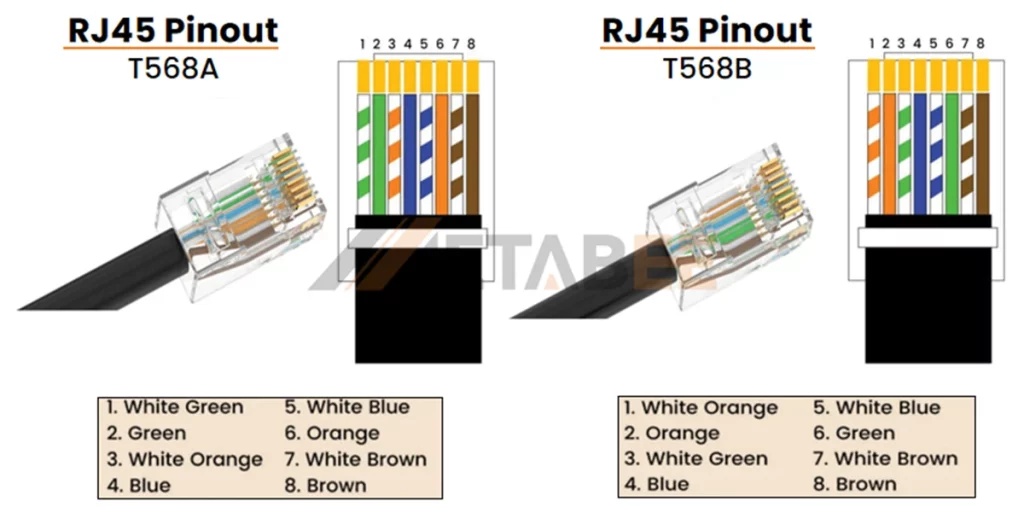
| Pin | Wire color | Signal | Signal description |
|---|---|---|---|
| 1 | White/Green | TX1+ | Transmit + |
| 2 | Green | TX1- | Transmit – |
| 3 | White/Orange | RX+ | Receive + |
| 4 | Blue | TX2+ | Bi-Directional Transmit + |
| 5 | White/Blue | TX2- | Bi-Directional Transmit – |
| 6 | Orange | RX- | Receive – |
| 7 | White/Brown | TX3+ | Bi-Directional Transmit + |
| 8 | Brown | TX3- | Bi-Directional Transmit – |
| Pin | Wire color | Signal | Signal description |
| 1 | White/orange | TX1+ | Transmit + |
| 2 | Orange | TX1- | Transmit – |
| 3 | White/Green | RX+ | Receive + |
| 4 | Blue | TX2+ | Bi-Directional Transmit + |
| 5 | White/Blue | TX2- | Bi-Directional Transmit – |
| 6 | Green | RX- | Receive – |
| 7 | White/Brown | TX3+ | Bi-Directional Transmit + |
| 8 | Brown | TX3- | Bi-Directional Transmit – |
RJ11 vs RJ12
While discussing phone connectors, we often see rj11 vs rj12 mentioned. What is the difference?
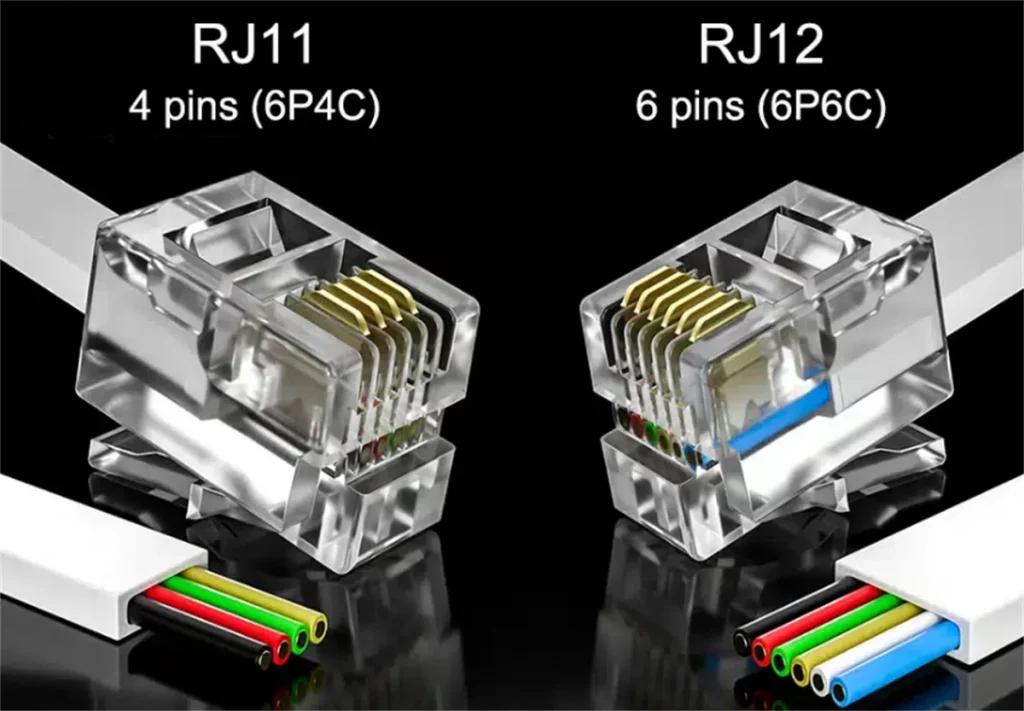
- RJ11: Uses a 6P4C connector (6 slots, 4 metal pins). It supports up to 2 phone lines.
- RJ12: Uses a 6P6C connector (6 slots, 6 metal pins). All slots are populated.
Difference between rj11 and rj12: They are the exact same size and shape. You can physically plug an RJ12 into an RJ11 port. The difference is internal; RJ12 is used for system phones in offices where 3 lines (Key Telephone Systems) are needed. For standard home use, RJ11 remains the default.
| Feature | RJ11 | RJ12 |
| Connector Standard | 6P4C (6 Positions, 4 Contacts) | 6P6C (6 Positions, 6 Contacts) |
| Active Pins | 2 or 4 Pins (Usually center 2 utilized) | 6 Pins (All 6 contacts utilized) |
| Physical Size | Identical to RJ12 | Identical to RJ11 |
| Wires Connected | 1 pair (2 wires) or 2 pairs (4 wires) | 3 pairs (6 wires) |
| Primary Application | Single residential phone lines, ADSL | System Phones, Office PBX, Key Systems |
| Compatibility | Can fit into RJ12 jack (but limits function) | Can fit into RJ11 jack (extra pins unused) |
How to Choose RJ11 and RJ45 Connector?
Knowing which connector you need is step one; ensuring you get a high-quality component is step two. Poorly made plugs can lead to signal loss or installation headaches. Here is a quick guide to selecting the right version of each.
Selecting RJ45 Connectors
When buying RJ45 plugs for Ethernet, focus on matching the connector to your specific cable type:
- Cable Category: Always match the plug to the cable (e.g., use Cat6 plugs for Cat6 cable). The wire thickness varies between standards, and a mismatch can lead to loose connections.
- Shielding (UTP vs. STP): Use standard Unshielded (UTP) plugs for most home networks. For high-interference environments, choose Shielded (STP) plugs with metal casings. Metabee offers industrial-grade shielded connectors specifically designed to block electromagnetic noise and ensure absolute signal integrity.
- Design Style: For easier installation, consider Pass-Through connectors, which allow wires to slide out the front for verification before crimping.
- Contact Quality: Look for 50-micron gold plating on the contacts to prevent corrosion and ensure the best data transmission.
Selecting RJ11 Connectors
For telephone and DSL lines, the choice is simpler but still important:
- Pin Configuration (6P4C vs. 6P2C): Always choose 6P4C (4 pins) connectors. They are compatible with single-line phones (using the center 2 pins) but offer the flexibility to handle a second line if needed.
- Durability: Inspect the plastic tab. It should be flexible and sturdy. Brittle, cloudy plastic tabs break easily, causing the plug to fall out of the jack constantly.
Conclusion
The debate of RJ11 vs RJ45 ultimately comes down to bandwidth and purpose. RJ11 remains the faithful standard for low-speed voice and DSL connections, utilizing just 4 pins. In contrast, RJ45 is the powerhouse of connectivity, utilizing 8 pins to deliver high-speed data and power (PoE) to our modern devices.
Your Key Takeaways:
RJ45 = Data: The wider connector for Ethernet, routers, and IP cameras.
RJ11 = Voice: The narrower connector for landlines and modem wall jacks.
Interchangeability: Are rj11 and rj45 interchangeable? No. Physical incompatibility means swapping them risks damaging the delicate pins inside the port.
By understanding the difference between rj11 and rj45, the pinouts, and the physical constraints, you ensure your network runs at peak performance without hardware mishaps.
Need Professional Advice?
Wiring a complex office network or unsure which bulk cables to order? Don’t risk downtime with the wrong components. Contact our networking specialists today for a custom solution tailored to your infrastructure.
Related Product
FAQs
Are RJ45 and RJ11 cables interchangeable?
No, RJ45 and RJ11 cables are not interchangeable. RJ45 is for Ethernet connections, and RJ11 is for telephone lines. Using them incorrectly can damage devices and affect performance.
Can rj11 be used for internet?
Yes, but only for DSL (Digital Subscriber Line) internet connections that run over telephone lines. It cannot be used for Ethernet or fiber optic internet connections, which require RJ45.
What type of port uses an rj11 connector?
Wall phone jacks, older fax machines, and the “Line” or “DSL” port on the back of a broadband modem.
Can I plug an ethernet cable into a wifi extender?
Yes. Most Wi-Fi extenders have an RJ45 port. You can use an Ethernet cable to connect the extender to your router (for Access Point mode) or to a device like a PC (to give it Wi-Fi capability).
Is there an adapter for RJ11 to RJ45?
Adapters exist, but they do not convert the signal. You cannot turn an analog phone line into an Ethernet signal just by changing the plug shape. You need a modem (Demodulator) to convert the DSL signal (RJ11) into a digital Ethernet signal (RJ45).
Why does my RJ45 connector have metal casing?
That is a Shielded RJ45 connector (STP). It is used with shielded twisted copper wire to prevent electromagnetic interference (EMI) in industrial environments.
Can you plug rj11 into rj45?
Physically, it fits, but you should not do it. The smaller RJ11 connector can permanently damage the outer pins (1 and 8) of the RJ45 jack.
