



Networking hardware decisions often come down to one question: copper or fiber? On a modern high-performance switch, the two most common interfaces are RJ45 and SFP. Each option has different requirements for distance, bandwidth, power consumption, and long-term scalability.
Choosing the wrong interface can increase latency, limit throughput, and raise deployment costs. This guide explains the key differences in the SFP vs RJ45 comparison, including performance, cabling, and typical use cases. It will help you select the right interface for your network design.
SFP and RJ45 Overview
Before comparing performance, we must first define the physical interfaces. While SFP and RJ45 are both ubiquitous Ethernet connectivity options, they are fundamentally distinct in their mechanical design and signaling characteristics.
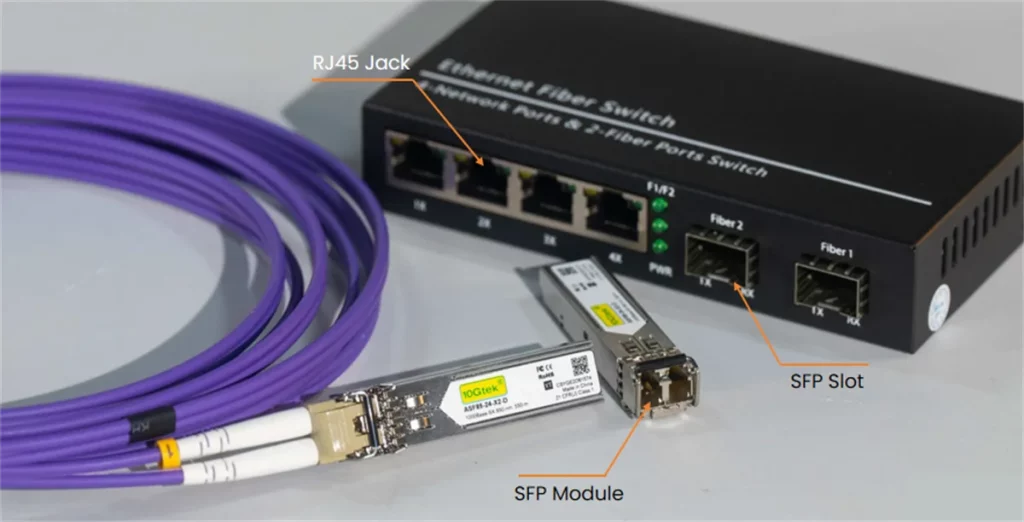
What is an SFP port?
Many people ask what is SFP or what is an SFP port on a switch. The simplest answer is: an SFP port is a slot designed to accept an SFP transceiver module.
SFP stands for Small Form-factor Pluggable. It is a standardized modular interface used on switches, routers, firewalls, and servers. Instead of a built-in fixed connector, the device provides an SFP cage. You insert the transceiver that matches your cable type and network requirements.
So when people ask what is an SFP port, they are really asking what the module does. The module converts electrical signals inside the switch into the correct format for transmission over fiber or copper.
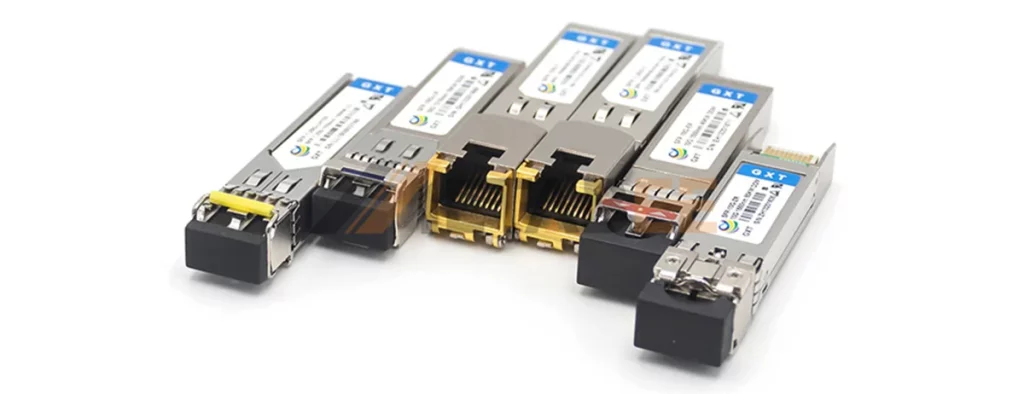
Typical SFP modules include:
- 1G fiber transceivers such as 1000BASE-SX and 1000BASE-LX
- copper SFP modules such as 1000BASE-T
- direct attach cables (DAC) for short-range switch-to-switch links
If you are wondering what is the SFP module, think of it as a removable network interface. It can be replaced or upgraded without changing the switch.
For example, you can use the same switch port for short-range fiber today, and later swap the module for longer-distance fiber if your infrastructure changes.
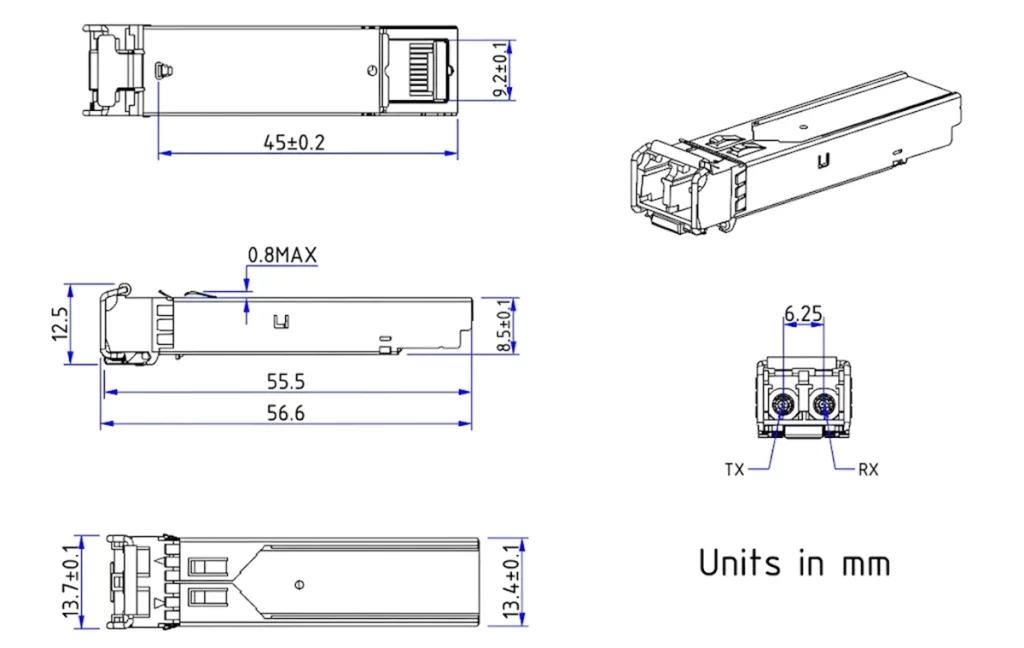
Mechanical Dimensions of SFP Transceiver Module
What is a RJ45 Jack?
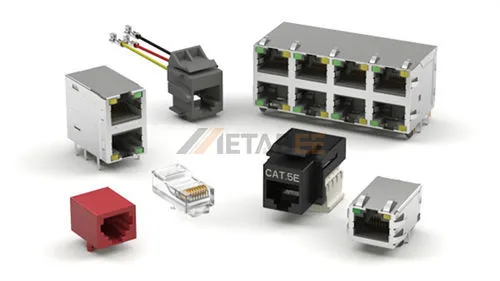
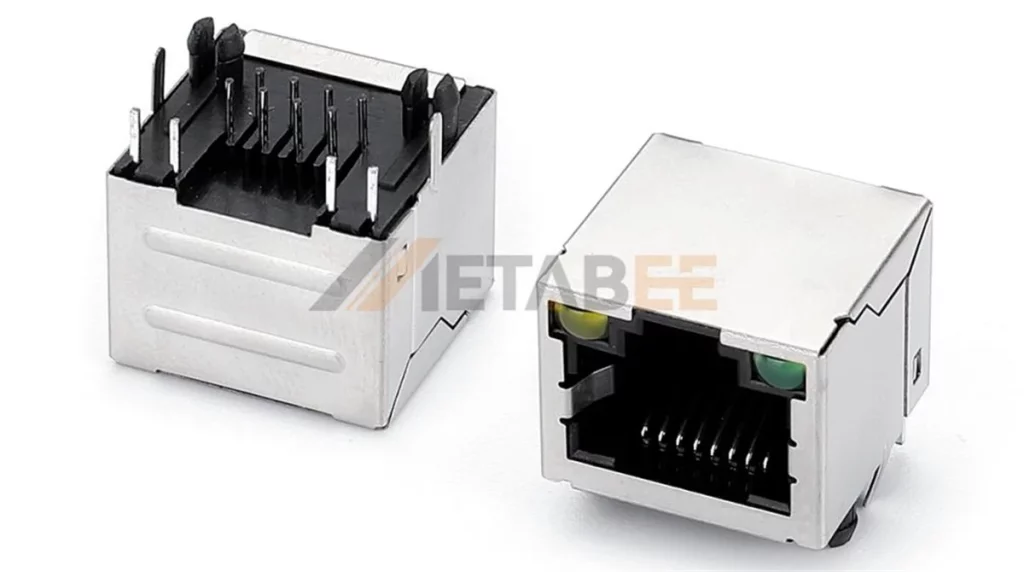
The RJ45 Jack (Registered Jack 45) is the standardized 8P8C (8 position, 8 contact) interface used for Ethernet over twisted-pair copper cabling. It is a fixed interface, meaning its physical and electrical properties are determined at the time of the switch’s manufacture.
what is an RJ45 Jack used for? it primarily serves as the standard for Local Area Network (LAN) connectivity for end-user devices. It is compatible with Cat5e, Cat6, and Cat6a cables. While highly convenient for “plug-and-play” environments, a RJ45 Jack lacks the modularity of SFP, confining the user to copper media and a maximum distance of 100 meters.
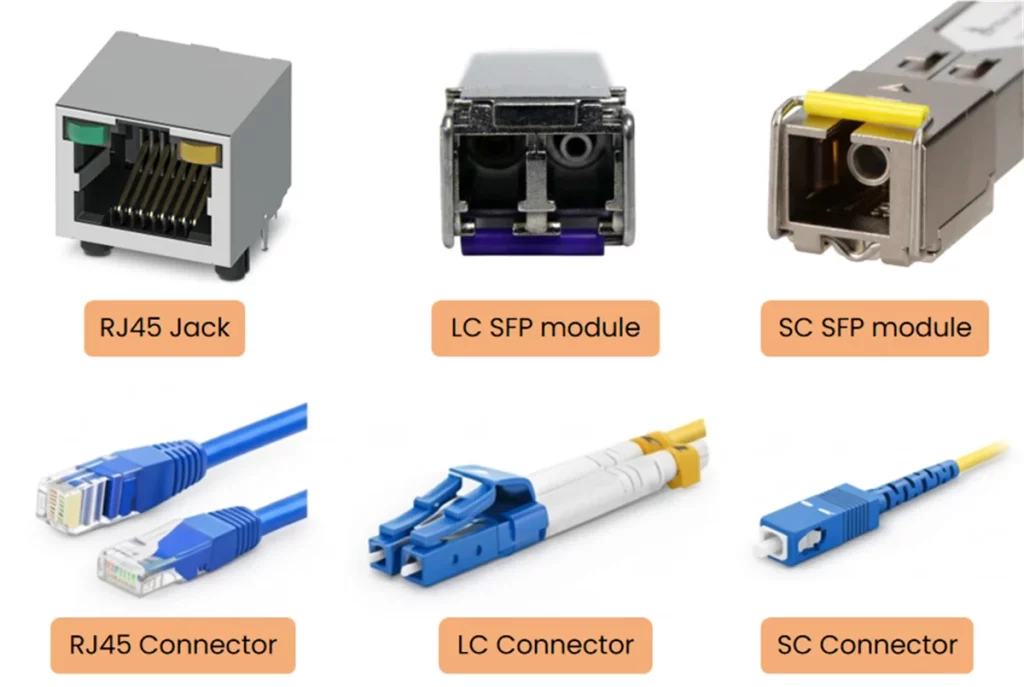
SFP ports do not use RJ45 connectors. Instead, they rely on different connector standards depending on the transceiver type and fiber cable. The most common fiber connectors are LC and SC, which are widely used for optical patch cords in data center and telecom environments. Understanding these connector types helps avoid compatibility issues when selecting SFP modules and fiber jumpers. The following diagram shows the physical differences between RJ45, LC, and SC connectors.
SFP vs RJ45: What’s the Difference?
Although both interfaces support Ethernet, they behave differently in performance, deployment cost, and scalability. The most important comparison is not the physical shape of the port. It is the transmission media and the networking architecture behind it.
Below are the real-world differences that matter.
Distance and Media Comparison
Transmission distance is the most rigid constraint in the sfp port vs rj45 port selection process.
- RJ45 (Copper): Adhering to IEEE 802.3 standards, copper Ethernet is limited by signal attenuation and crosstalk. Regardless of whether you use Cat6 or Cat7, the maximum effective reach is 100 meters.
- SFP (Fiber): SFP interfaces utilize light-based transmission through glass silica. Depending on the transceiver and cable type, distances can reach 550m (Multimode OM3/OM4) or up to 120km (Single-mode). This makes SFP the only viable choice for campus-wide or metropolitan area networks.
Data Rate and Bandwidth Comparison
Both SFP and RJ45 support stable Ethernet connections, but they are optimized for different speed and cabling standards.
RJ45 ports mainly support copper Ethernet, including 1GbE (1000BASE-T). Many enterprise switches also support 2.5GbE, 5GbE, and 10GbE (10GBASE-T), which makes RJ45 ideal for structured copper cabling and access-layer deployments.
SFP ports are most common for 1GbE fiber links such as 1000BASE-SX and 1000BASE-LX. For 10GbE, the standard solution is SFP+, which is designed for fiber or DAC connections.
The real difference becomes obvious at 10GbE.
- 10GBASE-T (RJ45): 10GBASE-T (RJ45) technology allows 10Gbps over copper but requires significant power to maintain signal integrity over the 100m limit. This intensive digital signal processing (DSP) adds approximately 2.6 microseconds of latency per link.
- SFP+ (10G SFP): SFP+ is the enhanced version of SFP designed for 10Gbps. In a 10gbe sfp+ vs rj45 comparison, SFP+ is widely considered the superior choice for high-density environments due to its vastly lower thermal footprint and superior bandwidth density.
Latency Comparison
- RJ45: Copper-based RJ45 connections introduce higher latency due to the complex PHY-layer processing required for signal integrity, noise cancellation, and echo suppression.
- SFP: Optical SFP modules offer near-zero latency. Because optical modules convert light directly, there is no need for complex digital signal processing (DSP) inside the transceiver.
The Impact:
For standard office traffic, the microsecond-level difference is negligible. However, in latency-sensitive environments like high-frequency trading (HFT) or real-time industrial automation, the speed of light in fiber provides a definitive competitive edge.
EMI/RFI Resistance Comparison
Copper cabling is susceptible to Electromagnetic Interference (EMI) and Radio Frequency Interference (RFI). In industrial environments near high-voltage machinery or large motors, a RJ45 port may experience high bit-error rates. SFP modules utilizing fiber optics are dielectric; they do not conduct electricity and are immune to EMI, ensuring stable data throughput in electrically “noisy” environments.
PoE Compatibility Comparison
A significant advantage of the RJ45 port is its ability to support Power over Ethernet (PoE).
- RJ45: RJ45 ports support IEEE 802.3af/at/bt standards. By integrating precision high-voltage transformers, or integrated magnetics, these connectors deliver up to 90W to IP cameras, access points, and VoIP phones. For high-power installations, Metabee RJ45 magnetic jacks are essential to reduce signal noise and maximize power efficiency.
- SFP: Since fiber optics transmit light, not electricity, standard SFP ports cannot deliver PoE. If an SFP link is required for a remote PoE device, a media converter or a PoE-enabled injector must be used at the remote end.
Related Post: PoE Pinout Guide:Wiring, Standards & Safety (Active/Passive)
Cost Comparison
- Initial Cost: RJ45 interfaces hold a clear advantage in capital expenditure (CAPEX). Since copper ports are typically integrated directly into the switch hardware, you avoid the additional cost of purchasing individual transceivers for every connection.
- Total Cost of Ownership (TCO): Although RJ45 is cheaper upfront, optical modules offer a lower Total Cost of Ownership (TCO) over time. 10G copper ports are power-intensive, typically consuming 2.5W to 5W per port. Conversely, optical modules draw less than 0.5W. In a high-density data center with hundreds of ports, this difference is massive.
Power Consumption Comparison
Power efficiency is a critical but often overlooked factor in network design. A difference of 1W to 2W per port may seem small. However, the cumulative cost is significant for a 48-port switch operating 24/7.
Standard Gigabit SFP optical transceivers typically consume between 0.5W and 1.2W. In contrast, RJ45 (1000Base-T) interfaces generally require 1.5W to 2.5W. This higher power draw is due to the complex signal processing needed to maintain data integrity over copper cables.
The gap widens drastically in 10GbE environments. A 10G SFP+ DAC consumes only 0.1W, and an SFP+ Fiber module uses about 1W. Meanwhile, a 10GBASE-T RJ45 port can draw up to 5W. Over a year, an RJ45-based switch incurs substantially higher electricity and cooling costs. For enterprise data centers, choosing SFP interfaces is a strategic move to reduce long-term OPEX.
Applications for SFP vs RJ45
- Use RJ45 for: Desktop connections, short-range office patching (under 100m), and powering PoE devices.
- Use SFP for: Switch-to-switch uplinks, connecting buildings, and high-speed server-to-storage links where low latency is mandatory.
SFP vs RJ45 Summary Table
| Comparison Factor | RJ45 Port | SFP Port |
|---|---|---|
| Transmission Media | Copper twisted-pair only | Fiber, DAC, or copper via module |
| Max Practical Distance | Up to 100 m | Depends on module, can reach kilometers |
| Common Speed Options | 1G / 2.5G / 5G / 10G | 1G (SFP), 10G (SFP+) |
| 10GbE Deployment | 10GBASE-T | SFP+ DAC / 10GBASE-SR / 10GBASE-LR |
| Latency at 10GbE | Higher | Lower |
| Heat and Power Use | Higher for 10GBASE-T | Lower for SFP+ fiber/DAC |
| EMI/RFI Resistance | Moderate, depends on shielding | Excellent with fiber |
| PoE Support | Yes | No |
| Cable Management | Bulky in dense racks | Cleaner and lighter |
| Upgrade Flexibility | Limited | High, swap modules |
| Best Use Cases | Office access, PoE devices | Uplinks, backbone, data centers |
How to choose between SFP and RJ45?
To determine the optimal interface, evaluate your network based on the following technical hierarchy:
- Distance Requirements: If the link exceeds 100 meters, SFP is mandatory.
- Thermal Constraints: If you are populating a 48-port switch in a rack with limited airflow, sfp vs rj45 10gbe thermal dynamics favor SFP+ to prevent port throttling.
- Power Delivery: If the end-device requires power (PoE), RJ45 is the logical choice.
- Scalability: From a hardware lifecycle perspective, SFP/SFP+ offers a more future-proof upgrade path. You can often upgrade from 1GbE to 10GbE by simply replacing a 1G SFP module with an SFP+ transceiver, and later migrate toward QSFP+ or QSFP28 platforms. By contrast, 10GBASE-T is mostly limited to 10GbE, and higher-speed upgrades often require re-cabling.
10GBASE-T vs SFP+: Which is Better for Your 10G Network?
Upgrading to 10GbE is often where the SFP+ vs rj45 10gbe debate becomes unavoidable. Both 10GBASE-T and SFP+ deliver 10Gbps throughput, but they are built for different network environments. One is designed for structured copper cabling, while the other is designed for modular high-density switching.
To choose correctly, you need to understand what each technology is, what its real limitations are, and how it behaves in a production network.
What Is 10GBASE-T?
10GBASE-T is a 10 Gigabit Ethernet standard(IEEE 802.3an) that runs over twisted-pair copper cabling. 10GBASE-T allows you to deploy 10GbE without switching to fiber, as long as your cabling quality meets the requirements.
Key Features of 10GBASE-T:
- Physical interface: RJ45
- Cable requirement: Cat6a is recommended for stable 10GbE performance
- Maximum link length: up to 100 meters with proper cabling
- Compatibility: supports auto-negotiation with 1GbE and sometimes lower speeds
- Deployment advantage: can reuse existing copper pathways and patch panels
- Main trade-off: higher power draw and heat generation compared to SFP+ solutions
What Is SFP+?
SFP+ (Small Form-factor Pluggable Plus) is a compact, hot-swappable optical interface standard (IEEE 802.3ae) for 10Gbps networking. Unlike the fixed copper port of 10GBASE-T, SFP+ is a “modular cage” that accepts various transceivers, offering unmatched flexibility for long-distance and high-density applications.
Key Features of SFP+:
- Interface type: modular transceiver-based port
- Common media: Supports Multi-mode fiber, Single-mode fiber, and Direct Attach Copper (DAC).
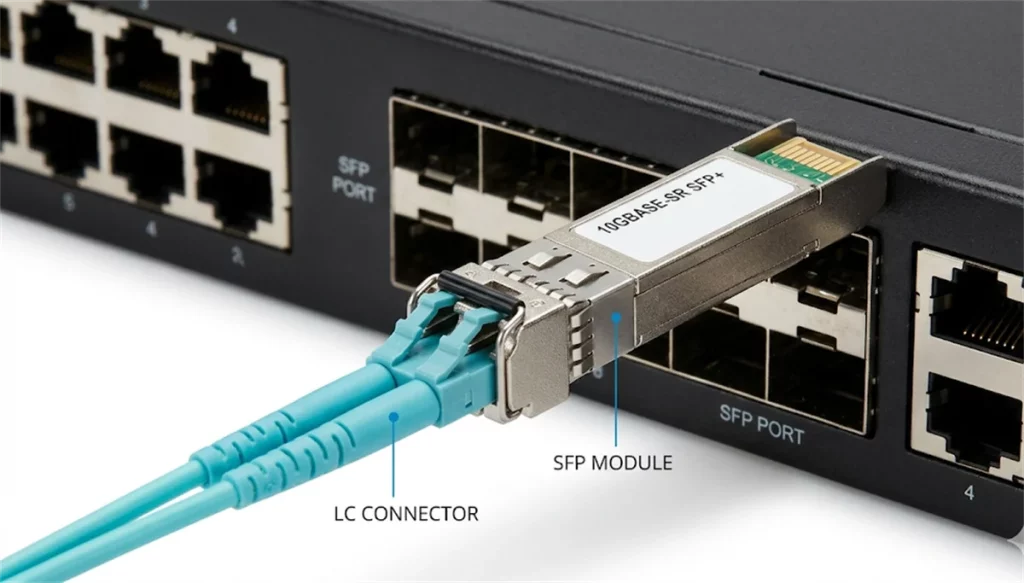
- Typical connector type: LC (fiber modules) or integrated DAC connectors
- Distance range: Can transmit data from 30 centimeters (via DAC) up to 40 kilometers (via Fiber).
- Upgrade advantage: easy to scale by swapping transceivers
- Thermal profile: generally lower power consumption and lower heat output
10GBASE-T vs SFP+ Summary Table
| Factor | 10GBASE-T (RJ45) | SFP+ |
|---|---|---|
| Port type | Fixed copper port | Modular transceiver port |
| Typical cable | Cat6a copper | DAC or fiber |
| Max practical distance | Up to 100 m | Depends on module |
| Power and heat | Higher | Lower |
| Latency | Higher | Lower |
| Port density | Limited in dense switches | Higher, better for ToR |
| Best environment | Office cabling, enterprise buildings | Data centers, backbone networks |
| Upgrade flexibility | Low | High |
Summarize: If you are building a modern 10GbE network from scratch, SFP+ is usually the better long-term choice. It provides better efficiency, lower latency, and stronger scalability for data center environments.
However, if your network relies heavily on existing copper infrastructure, 10GBASE-T remains a practical solution. It allows you to upgrade to 10GbE while keeping the RJ45 ecosystem and structured cabling system.
For most enterprises, the best design is often a hybrid approach: RJ45 for access and distribution networks, and SFP+ for uplinks and core connections.
Conclusion
Choosing between SFP and RJ45 is not a simple “either-or” decision. It is an architectural choice based on your specific network environment. Thanks to its cost-efficiency and native PoE support, the RJ45 port remains the cornerstone for edge connectivity. In contrast, the SFP port provides essential scalability, long-distance reach, and ultra-low latency for modern network backbones. By balancing these interfaces, engineers can build robust, efficient, and future-ready data infrastructure.
Are you facing complex cabling challenges or need custom hardware for industrial applications? Contact our technical support specialists today for expert procurement and deployment advice.
Related Product
10G SFP+ Fiber Transceiver Modules
1.25G SFP Fiber Transceiver Modules
FAQs
Q1: Can SFP connect to RJ45?
A: Yes, you can use an SFP to RJ45 Copper Transceiver. This module plugs into the SFP slot and provides a standard Ethernet jack, allowing you to use existing Cat6 or Cat6a copper cables on a port originally designed for fiber.
Q2: Can I run 1Gbps speed on an SFP port?
A: Absolutely. Standard SFP ports are designed for 1Gbps by default. Furthermore, most 10G SFP+ ports are backward compatible, allowing you to insert a 1G SFP module to maintain a stable gigabit connection.
Q3: Can Cat6a cables completely replace short-distance fiber?
A: While Cat6a supports 10Gbps up to 100 meters, it cannot match fiber’s immunity to electromagnetic interference (EMI) or its superior power efficiency. In environments with high electrical noise or strict thermal limits, fiber remains the professional choice for signal integrity.
Q4: What are Combo Ports, and how do they work?
A: Combo ports are a pair of physically adjacent RJ45 and SFP ports that share the same internal switching fabric. They function on an “either-or” logic, meaning if you plug a cable into the SFP port, the corresponding RJ45 port is automatically disabled.
Q5: How do I choose high-quality patch cords for SFP modules?
A: First, ensure the fiber type (Single-mode OS2 or Multi-mode OM3/OM4) exactly matches your SFP module’s specifications. You should also prioritize factory-tested cables with low insertion loss and high-quality ceramic ferrules to ensure long-term network stability.
